Create and Link an APP-ID
Introduction
All use cases on the Connected AI Platform require their own APP-ID, which must be linked to the use case. The APP-ID is used at BMW IT to organize applications and locate them within the hierarchy of the Software Portfolio. This page provides an overview of the software portfolio, explains its importance, and guides you through obtaining an APP-ID for use with the Connected AI Platform. Each use case uses its own APP-ID because it is going into production. The use case team is fully responsible for the APP-ID and owns all related artifacts, including Information Classification (ICL), IT Security Conformity Statement (ITSCS), Service Impact Assessment (SIA), and Privacy Impact Assessment (PIA). See: ICL, ITSCS, SIA, PIA.
About the Software Portfolio
The goal of this process is to ensure that architecture decisions are approved and properly documented in the Enterprise Architecture Repository. The process is documented as part of the Agile Working Model. The portfolio consists of several configuration objects stored in a CMDB (Configuration Management Database)—a centralized system used in IT service management (ITSM) to store and manage information about all components in an organization’s IT environment.
The Software Portfolio organizes its objects in a hierarchical product catalog.
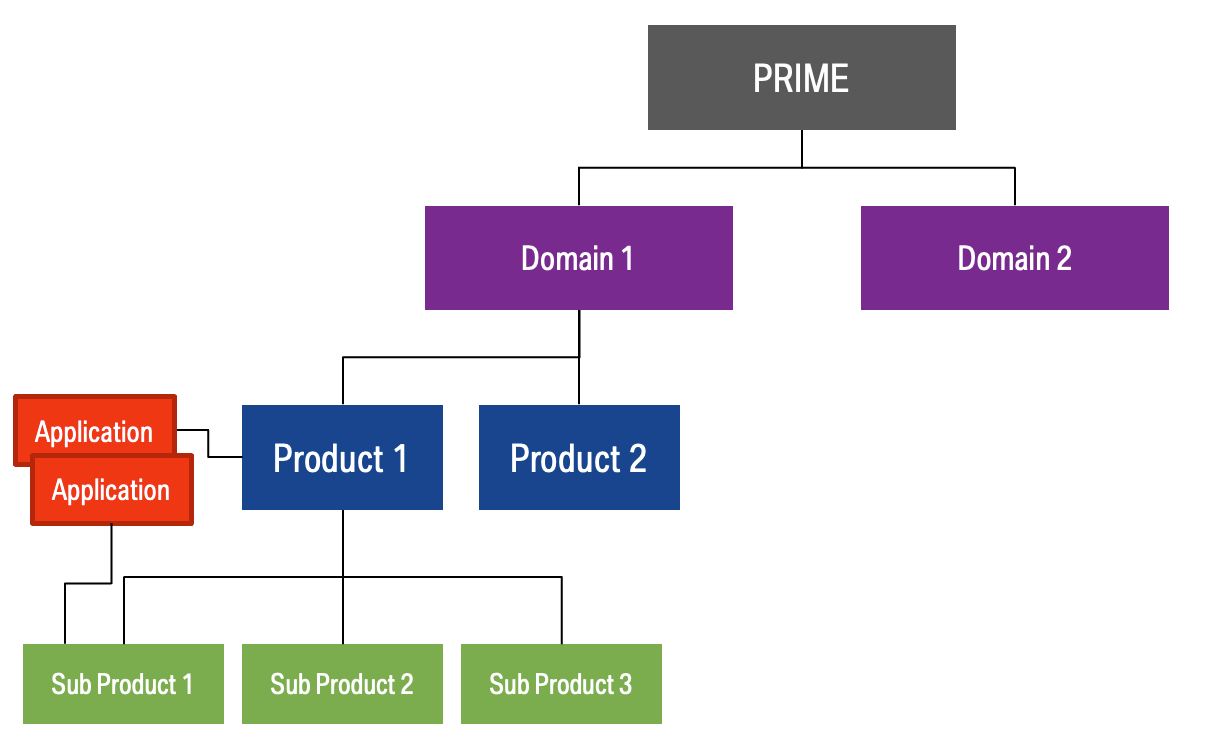
BMW uses a tool called ConnectIT to manage its software portfolio. ConnectIT is the central repository for applications, business objects, and infrastructure components within BMW Group IT. It serves as the basis for applications and infrastructure components (with their relevant attributes and roles) in the CMDB. ConnectIT is fundamental to IT management processes, including IT strategy, landscape management, planning, and service management.
What is an IT Product?
An IT Product at BMW is defined by several key characteristics. Each product has a designated Product Owner who is responsible for its overall direction and success. The product delivers clear value to its customers, which may include end customers, business departments, or other IT departments. It is guided by a Product Vision that sets its strategic orientation for the future. Development and planning for the product are continuous, iterative, and incremental, typically managed through tools such as the Product Backlog and Sprint Backlog. DevOps teams are responsible for the development, maintenance, and operation of the product throughout its entire lifecycle, ensuring that services are provided reliably and efficiently. An IT Product at BMW is assigned a SWP-ID.
What is an IT Application?
An application is a system for collecting, saving, processing, or presenting data using a computer. The term refers to software components that can be executed. A BMW IT Application is assigned an APP-ID and linked to an IT Product or IT Sub-Product.
How to Obtain an APP-ID
Follow these steps to create an APP-ID and assign it to your use case SWP-ID.
1. Check for Existing Objects in Your Domain
Before creating new CMDB objects, check whether your domain (main department) already has APP-IDs (Applications) or SWP-IDs (IT Products) in use. It is best practice to integrate new objects into an existing structure managed by your main department.
If your main department does not have an IT Product, the Connected AI Platform can act as the IT Product for your APP-ID. In this case, ensure the APP-ID is created with the correct attributes.
If you assign an APP-ID to the IT Product Connected AI Services (SWP-4633), your APP-ID must be a VM0 application and assigned via Functional Assignment only. More details are provided below.
2. Create and Link Your Application
To create a new application (with an APP-ID), follow these steps:
- Log in to ConnectIT. Start ConnectIT by following the Log-in FAQ here.
- Click “New” → “Application” on the homepage or under "Application Architecture" → "Application" to start the Application Wizard.
- Fill out all required fields (application name, version, start and end date, and description) in all tabs: Base Data, Authorized Access, IT Governance Information, Additional Information, Migration Path, and Support & Hotline.
- Refer to the "How can I create a new application?" guide and the "How to use the Application Wizard?" guide.
- Assign the Product Portfolio Manager (PPM) to the person responsible for Connected AI Platform. Currently, this is Fabian Schatz, DE-70.
- Select Functional Application as the Application Type.
- Assign your application to the responsible (Sub) Product in the IT Product Catalog. This can be your own IT Product in your main department. If you do not have an SWP-ID, you can assign the application to Connected AI Services (SWP-4633). Only assign the application functionally; a steering assignment is not allowed.
You must create a VM0 application. The VM0/VM4 concept defines the responsibility model ("VerantwortungsModell") for applications:
- VM0 applications: BMW business units are accountable for maintenance and operations.
- VM4 applications: BMW Central IT (FG Departments) is responsible for operation and maintenance.
Learn more about VM0/VM4 applications here.
VM0 Support
A dedicated Service Desk for the VM0 Service Model supports all VM0 applications with self-help oriented support. See: VM0 Support.
VM0 Responsibility Model Overview
Applications in the VM0 responsibility model enable business departments to operate, plan, budget, and maintain applications without involving Central IT. VM0 applications generate and manage incidents, problems, change tickets, and service requests in ITSM tools (e.g., ITSM.Next, MyBMWIT). They are operated and maintained by the business department and its appointed responsible persons.
VM0 Service Desk Support
The VM0 Service Desk helps Operations and Maintenance responsible persons meet their IT responsibilities across the application lifecycle (from ConnectIT setup and start-up through regular operation to retirement):
- Advisory, self-help-oriented support
- Assistance to fulfill Operations/Maintenance responsibilities
- Guidance on IT tools (ITSM.Next, MyBMWIT, etc.)
- Support during transfer to IT production operations, including traceability
Within VM0 Business Application Support, IT consulting is provided to support the introduction and transfer into regular IT operations for self-generated applications.
Service Offering
- Start-Up Management: Creating an application in ConnectIT
- ConnectIT Data Quality: Guidance to achieve green status for data quality in ConnectIT
- IT Compliance: Guidance on compliance artifacts (ICL, ITSCS, SIA, PIA)
- PIC Process: Guidance on problem, incident, and change tickets
- IT Tool Guidance: Ordering infrastructure and how it connects with ConnectIT
- Lifecycle Assistance: Maintenance of the application during its lifecycle
- TLM Guidance: Lifecycle guidance and information on infrastructure, as well as Application Lifecycle Management and maintenance
- Application Retirement: Support and guidance on retiring an application and related infrastructure
Compliance and Documentation Focus
The VM0 Service Team supports departments in meeting BMW IT guidelines:
- Safeguarding enterprise architecture compliance
- Up-to-date and consistent documentation
- Ensuring availability, integrity, and confidentiality
- Active use of, and compliance with, defined BMW IT processes
To achieve these objectives, the VM0 Service Team coordinates and executes relevant IT processes and instructions in line with BMW standards.
Related Links
- IT.01.01.06 Manage IT Portfolio and Architecture
- ConnectIT
- ConnectIT Log-in FAQ
- How can I create a new application?
- How to use the Application Wizard?
- VM0/VM4 applications
- What is the Information Classification (ICL)?
- What is the IT Security Conformity Statement (ITSCS)?
- What is the Service Impact Assessment (SIA)?
- What is the Privacy Impact Assessment (PIA)?
- VM0 Support