Enable Vector Database
AWS PGVector has been integrated with the Connected AI Platform as a new database infrastructure for vector storage.
How to Enable
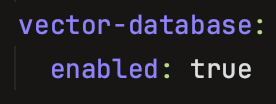
A parameter for this feature has been added to the products repository in the product.yaml file at the namespace level, as shown below. The value is set to false by default, meaning this feature is not enabled by default.
    vector-database:
      enabled: false
If you want to enable the Vector Database in a specific namespace, set the value to true, then raise a Pull Request to roll out the feature.
Once the Pull Request is merged and the rollout is done, log in to your AWS account, switch to Amazon RDS, and under the Databases label you will see the Vector Database has been created.

This option is currently not enabled for user roles, as this is a managed solution — it's not possible to check the RDS resources in the AWS console with the <product>-<namespace>-caip-developer role.
Please don't use any other role to customize this feature.