Integrate with CDH PII API
This page is a step-by-step guide on how to integrate CDH's PII API with your product, enabling the encryption and/or decryption — VIN to VAN and VAN to VIN — of PII (Personally Identifiable Information).
Any access implementation is handled by the self-service described on this page.
Required Information
The following information has to be provided along with the request:
| Field | Value |
|---|---|
| Environment | DEV, INT and/or PROD |
| AWS Account ID's | per environment |
| Required Operations | encrypt and/or decrypt |
If decryption is required, two additional steps are necessary:
- Attaching your PIA document (find it here).
- A list discriminating AWS role ARN patterns per account, in order to be allowlisted for decryption (i.e. list all
cd4ml/glue/sagemakerroles for the profile).
Below you can find an example request message:
Hello,
I want to request access and obtain an API key (PII API).
The staging environments are: <DEV, INT, and/or PROD>. AWS account ID for each environment: The requested operations are: <encrypt and/or decrypt.>
*** add the information below if decryption is included in the request *** PIA document: <insert link for your product's PIA> Please allowlist the following AWS role ARN patterns for decryption:
arn:aws:iam::<account-id>:role/<product-name>-<region>-<env>-<namespace>-cd4ml arn:aws:iam::<account-id>:role/<product-name>-<region>-<env>-<namespace>-glue-execution arn:aws:iam::<account-id>:role/<product-name>-<region>-<env>-<namespace>-sagemaker-execution
*** add the information above if decryption is included in the request ***
Regards,
Submitting Requests
Submitting a Request to Access PII API
PII API access can be requested by submitting a request either via My BMW IT or an ITSM Ticket, to be processed and granted by the CDH Team.
After sending the request to trigger the issuing process of the API key by the CDH Team, it should take approximately one day and will be sent to the requester's e-mail address.
My BMW IT
| Form URL | https://bmwprod.service-now.com/sp?id=sc_cat_item&sys_id=128174ee4fcb26005b02bc511310c789 |
| Request Type | User Service Request |
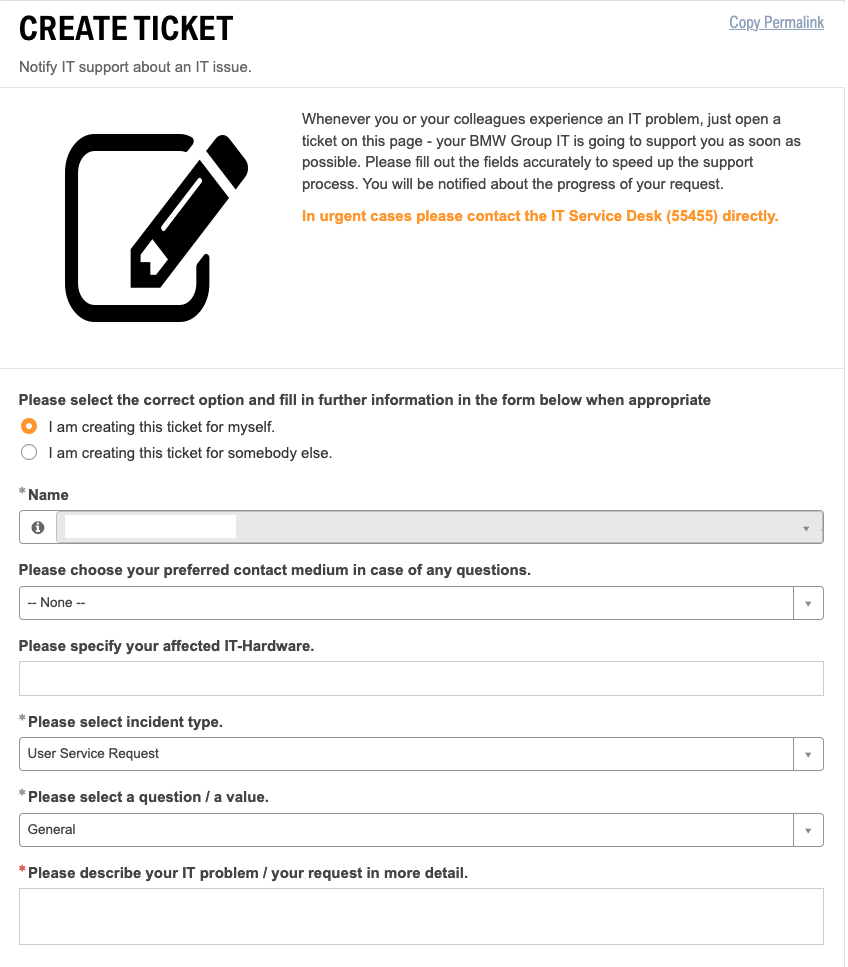
An example of the Ticket Creation Form on My BMW IT:
ITSM
| URL | https://itsmsuite.bmwgroup.net/ |
| Incident Type | User Service Request |
| Service | clouddatahub-auth:global |
Configuration on Connected AI
API Keys
The API key(s) sent by CDH must be stored in AWS Secrets Manager so it can be read by Connected AI. The secrets are already created as part of our provisioning process — you just need to update them with the information provided in the e-mail sent by the CDH Team.
To update the secrets, remember to use the caip-developer role to perform this action.
Secrets Name
CDH-PII-DEPERSO-<ENV>CDH-PII-REPERSO-<ENV>
<ENV> → TEST, INT or PROD
Keep in mind that if the environment is E2E, the DEPERSO/REPERSO is on INT, e.g.:
| AWS Account | Connected AI | CDH PII API |
|---|---|---|
| Non-production | test | DEV |
| Non-production | int | INT |
| Non-production | e2e | INT |
| Production | prod | PROD |
Product Configuration
Set the actions you need to enable on each namespace, and the CDH data environment to use, in the product.yaml file of your product on the Connected AI products repository. PII API configuration is located in the cdh section of each namespace, identified by the pii-api and cdh-pii-data settings.
The Connected AI Team does not allow pushing directly into the main branch, so a Pull Request must be opened in order to be evaluated by the team and then merged.
For example:
- Namespace A → can encrypt and decrypt
- Non-Prod Account → wants to use Prod and Test CDH data
- Prod Account → wants to use Prod CDH data
- Namespace B → can encrypt
- Non-Prod Account → wants to use Prod CDH data
- Prod Account → wants to use Prod CDH data
- Namespace C → can do neither
- Non-Prod Account → doesn't use CDH PII
- Prod Account → doesn't use CDH PII
So in the cdh section, we fill this array:
# On namespace A
pii-api: ["deperso", "reperso"]
non-prod-account:
  cdh-pii-data: ["test", "prod"]
prod-account:
  cdh-pii-data: ["prod"]

# On namespace B
pii-api: ["deperso"]
non-prod-account:
  cdh-pii-data: ["prod"]
prod-account:
  cdh-pii-data: ["prod"]

# On namespace C
pii-api: []
non-prod-account:
  cdh-pii-data: []
prod-account:
  cdh-pii-data: []
Testing
In order to validate whether encryption and decryption are functional, follow this procedure:
- Create a Notebook in Kubeflow.
- In JupyterLab, clone the cd4ml-pipelines-template repository.
- Use
06_cdh_pii_test_decrypt_encrypt.ipynbto test the PII API.
If functional, encryption (VIN to VAN) and/or decryption (VAN to VIN) will work and you will see this output:

Keep in mind that a notebook created under a given namespace will only allow testing the action(s) (encrypt/decrypt) requested for that specific namespace.
For instance, if namespace A is allowed to encrypt and decrypt, the notebook can be used to test both. However, if another namespace (e.g. namespace B) is only allowed to encrypt, the notebook can only be used to test encryption.