IAM: Roles and Rights in CAIP
Overview
Connected AI Platform (CAIP) uses Identity and Access Management (IAM) to control access to resources. Access is granted based on roles, which define the permissions a user or service has within the platform.
Recently the AWS CLI and BMWAWS CLI were deprecated. Orbit replaced the login functionality with the "orbit-use" CLI. You need to use the orbit-use CLI from now on to log in to your AWS accounts.
What happened?
- CAIP relies on Orbit’s custom roles to provide access to AWS for its use cases.
- FPC removed the "old way" of logging in to AWS, both via CLI and UI. See their knowledge article.
- FPC proposed a new solution to handle custom roles, which is not scalable enough for the Orbit platform.
- Orbit created the
orbit-useCLI as the new way to log in to AWS using Orbit custom roles.
If you encounter any issues or errors, or want to share feedback, please open an ITSM ticket (for immediate support) or add your feedback on this Confluence page.
Roles and Rights
To work with CAIP, assume the following IAM role format:
<orbit-space>-<orbit-teamspace>-caip-developer
Example:
If your Orbit Space is ai-rsrch and your Orbit Teamspace is aira, your role will be: ai-rsrch-aira-caip-developer.
This role grants developer access to CAIP resources within your teamspace.
Logging in with orbit-use CLI
Access to CAIP is managed via the orbit-use command-line interface (CLI), provided by our Orbit colleagues. This CLI helps you authenticate and configure your environment for CAIP and other Orbit services.
Installation
Install the CLI using pipx (recommended):
pipx install orbit-use --pip-args="--extra-index-url https://packages.orbit.bmwgroup.net/artifactory/api/pypi/funmarkt-orbit-use/simple"
Or with pip:
pip3 install orbit-use --index-url https://packages.orbit.bmwgroup.net/artifactory/api/pypi/funmarkt-orbit-use/simple"
Logging in to CAIP
Use the following command to assume your CAIP developer role:
orbit-use cloud <orbit-space> <dev|prod> <orbit-teamspace> --role caip-developer
<orbit-space>: Your Orbit Space name (e.g.,smartdaip)<dev|prod>: The account type (devorprod)<orbit-teamspace>: Your Orbit Teamspace name (e.g.,genai-tsara)--role caip-developer: The CAIP developer role to assume
Examples:
orbit-use cloud smartdaip dev genai-tsara --role caip-developer
orbit-use cloud ai-rsrch dev aira --role caip-developer
This command authenticates you and configures your environment for CAIP access. The CLI sets up cloud CLI integration, so you can use tools like aws with the configured profile.
Open the Orbit web interface after logging in by adding the --ui option:
orbit-use cloud <orbit-space> <dev|prod> <orbit-teamspace> --role caip-developer --ui
Examples:
orbit-use cloud smartdaip dev genai-tsara --role caip-developer --ui
orbit-use cloud ai-rsrch dev aira --role caip-developer --ui
Using the Configured Profile
After login, use cloud CLI tools with your profile:
aws --profile orbit-use-<orbit-space>-<dev|prod>-<orbit-teamspace>-caip-developer <command>
Examples:
aws --profile orbit-use-smartdaip-dev-genai-tsara-caip-developer sts get-caller-identity
aws --profile orbit-use-ai-rsrch-dev-aira-caip-developer sts get-caller-identity
Auto-detecting the CAIP role
If only one role is available in the requested teamspace (e.g., caip-developer), you can omit --role and let orbit-use auto-detect it:
orbit-use cloud <orbit-space> <dev|prod> <orbit-teamspace>
Example:
orbit-use cloud smartdaip dev genai-tsara
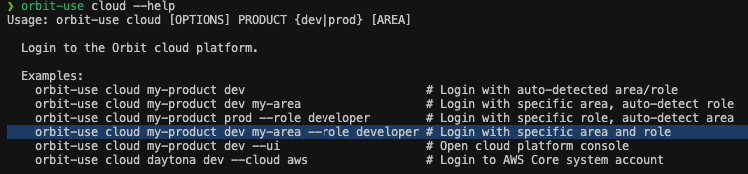
Help Option
Use the --help flag to get immediate support from the CLI.
More Information
For advanced usage, upgrading, or troubleshooting, refer to the Orbit Use documentation.
Support
For help and support, please reach out to us as described in our support documentation.