Set up a CDH Connection
To integrate CDH, complete the following steps:
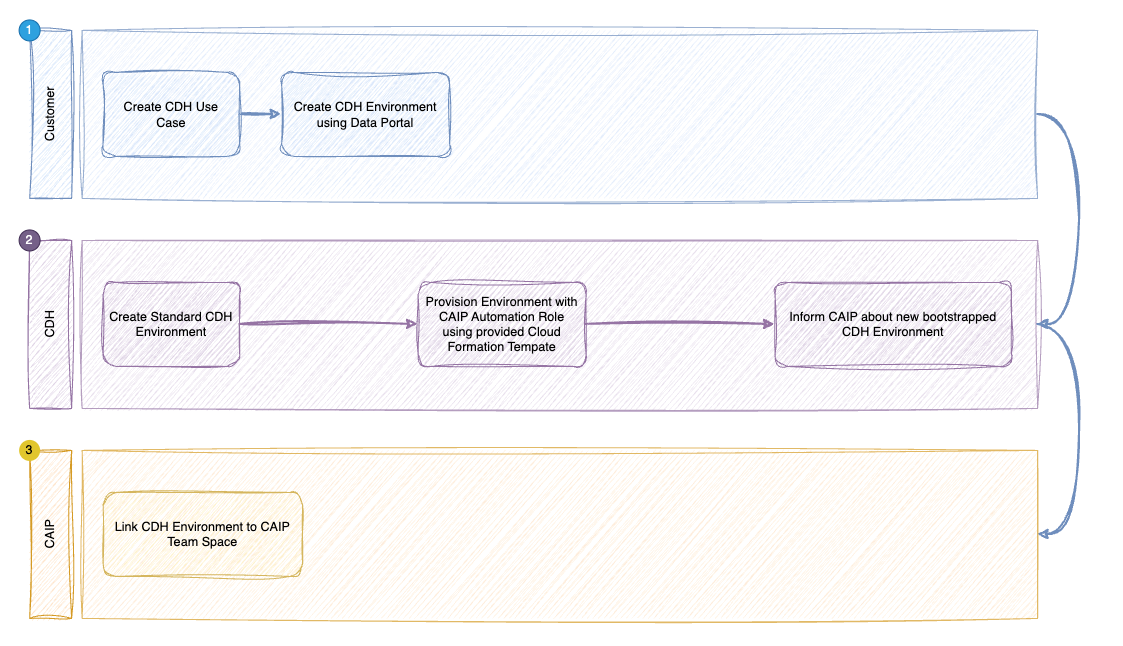
(1) Create Resources in the CDH Environment with an AWS CloudFormation Template
This template creates the infrastructure that allows the GitHub platform to authenticate with AWS using OpenID Connect (OIDC) federation. This follows AWS security best practices by eliminating the need to store static AWS access keys in the CI/CD system.
CloudFormation stack creation within your account is described here
1. Open the CloudFormation Service
- Sign in to the AWS Management Console.
- In the search bar, type CloudFormation and select it.
2. Start Creating a New Stack
- In the CloudFormation console, click Create stack (top right).
- Select With new resources (standard).
3. Upload the Template File
- Under Template, choose Upload a template file.
- Click Choose file, browse to your CloudFormation YAML/JSON file, select it, then click Open.
4. Configure Stack Details
- Enter a unique, friendly Stack name (e.g.,
CDHConnectionAccessRole). - If prompted for Parameters:
- Enter
Regionaseu-central-1.
- Enter
- Click Next.
5. Configure Stack Options (Advanced)
- (Optional) Set a Stack policy to control updates to stack resources.
- (Optional) Choose an IAM role or let CloudFormation create one.
- (Optional) Set up Notifications (Amazon SNS) for stack event alerts.
- (Optional) Add more Tags at the stack level.
- Scroll to the bottom and check I acknowledge that AWS CloudFormation might create IAM resources with custom names.
- Click Next.
6. Review Configuration
- Review all configuration details.
- AWS will summarize the resources to be created and the parameters you’ve set.
- Check for any errors or warnings.
7. Create the Stack
- Scroll to the bottom and click Submit.
- You’ll be taken to the Stacks page to monitor progress.
8. Monitor Stack Progress
- On the Stacks page, select your stack.
- Use the following tabs:
- Events: Shows actions (e.g.,
CREATE_IN_PROGRESS,CREATE_COMPLETE). - Resources: Lists all created resources, with logical/physical IDs and statuses.
- Events: Shows actions (e.g.,
- If a resource fails to create, check the Events tab for the failure reason.
9. Validate Stack Resources
- Wait for the stack status to show CREATE_COMPLETE.
10. (Optional) Delete the Stack
- To delete the stack, choose Delete stack.
- CloudFormation will remove resources in the correct order.
⚠️ Note: Deleting the stack will remove all resources it created. Ensure there are no external dependencies before deletion.
ROW CloudFormation Template is available here
AWSTemplateFormatVersion: '2010-09-09'
Description: CloudFormation template to create an OIDC provider and IAM role for GitHub Actions.

Parameters:
  Region:
    Type: String
    Default: eu-central-1
    Description: AWS region to deploy resources.

Resources:
  CodeConnectedOIDCProvider:
    Type: AWS::IAM::OIDCProvider
    Properties:
      Url: "https://token.actions.bmw.ghe.com"
      ClientIdList:
        - "sts.amazonaws.com"
      ThumbprintList:
        - "ee44782835d8fb31394da5ceb840dc93849bcf5a"
        - "a5391e7181fd2396c8a20a6aa09fe9c880716eec"

  CAIPAutomationRole:
    Type: AWS::IAM::Role
    Properties:
      RoleName: "caip-cdh-automation"
      AssumeRolePolicyDocument:
        Version: "2012-10-17"
        Statement:
          - Effect: "Allow"
            Principal:
              Federated: !GetAtt CodeConnectedOIDCProvider.Arn
            Action: "sts:AssumeRoleWithWebIdentity"
            Condition:
              StringEquals:
                "token.actions.bmw.ghe.com:aud": "sts.amazonaws.com"
              StringLike:
                "token.actions.bmw.ghe.com:sub":
                  - "repo:connected-ai/products:*"
          - Effect: "Allow"
            Principal:
              AWS: "arn:aws:iam::671994827252:role/daytona/daytona-developer-caip"
            Action: "sts:AssumeRole"

  CAIPAutomationPolicy:
    Type: AWS::IAM::Policy
    Properties:
      PolicyName: "caip-cdh-automation-policy"
      PolicyDocument:
        Version: "2012-10-17"
        Statement:
          - Effect: "Allow"
            Action: "*"
            Resource: "*"
      Roles:
        - !Ref CAIPAutomationRole

Outputs:
  OIDCProviderArn:
    Description: "ARN of the OIDC Provider"
    Value: !GetAtt CodeConnectedOIDCProvider.Arn

  IAMRoleArn:
    Description: "ARN of the IAM Role"
    Value: !GetAtt CAIPAutomationRole.Arn
CN CloudFormation Template is available here
Partition: For deployments in AWS China Regions, you must explicitly use the
aws-cnpartition.Tool Account: CN tool account ID is
643418770289.
AWSTemplateFormatVersion: '2010-09-09'
Description: CloudFormation template to create an OIDC provider and IAM role for GitHub Actions.

Parameters:
  Region:
    Type: String
    Default: cn-north-1
    Description: AWS region to deploy resources.

Resources:
  CodeConnectedOIDCProvider:
    Type: AWS::IAM::OIDCProvider
    Properties:
      Url: "https://token.actions.bmw.ghe.com"
      ClientIdList:
        - "sts.amazonaws.com"
      ThumbprintList:
        - "ee44782835d8fb31394da5ceb840dc93849bcf5a"
        - "a5391e7181fd2396c8a20a6aa09fe9c880716eec"

  CAIPAutomationRole:
    Type: AWS::IAM::Role
    Properties:
      RoleName: "caip-cdh-automation"
      AssumeRolePolicyDocument:
        Version: "2012-10-17"
        Statement:
          - Effect: "Allow"
            Principal:
              Federated: !GetAtt CodeConnectedOIDCProvider.Arn
            Action: "sts:AssumeRoleWithWebIdentity"
            Condition:
              StringEquals:
                "token.actions.bmw.ghe.com:aud": "sts.amazonaws.com"
              StringLike:
                "token.actions.bmw.ghe.com:sub":
                  - "repo:connected-ai/products:*"
          - Effect: "Allow"
            Principal:
              AWS:  "arn:aws-cn:iam::643418770289:role/daytona/daytona-developer-caip"
            Action: "sts:AssumeRole"

  CAIPAutomationPolicy:
    Type: AWS::IAM::Policy
    Properties:
      PolicyName: "caip-cdh-automation-policy"
      PolicyDocument:
        Version: "2012-10-17"
        Statement:
          - Effect: "Allow"
            Action: "*"
            Resource: "*"
      Roles:
        - !Ref CAIPAutomationRole

Outputs:
  OIDCProviderArn:
    Description: "ARN of the OIDC Provider"
    Value: !GetAtt CodeConnectedOIDCProvider.Arn

  IAMRoleArn:
    Description: "ARN of the IAM Role"
    Value: !GetAtt CAIPAutomationRole.Arn
Key Components of the CloudFormation Template
OIDC Provider (CodeConnectedOIDCProvider):
- Establishes trust between AWS and GitHub at https://token.actions.bmw.ghe.com
- Uses specific SSL certificate thumbprints to verify the identity provider's authenticity
- Configured to work with AWS STS (Security Token Service)
IAM Role (CAIPAutomationRole):
- Named
caip-cdh-automation - Can only be assumed by the OIDC provider when specific conditions are met
- Restricts access to repositories under the
connected-ai/productsorganization path
IAM Policy (CAIPAutomationPolicy):
- Grants automation control over the AWS account
(2) Service Request to the CAIP Platform Team
After making these changes, submit a service request to the CAIP platform team to complete the CDH connection setup. During the creation of the service request, you will be asked which CDH environments (Cloud Room account numbers) you want to map. Create one service request per stage (non-prod and prod). Each service request can include multiple CDH environments.