Model Registration and Staging in MLflow
Introduction
Once your model is trained, registering it in MLflow allows you to track different model versions and easily reference specific versions in your pipelines. This section guides you through adding MLflow to your project, modifying your training step to register models automatically, and creating a staging step to transition models through different lifecycle stages (Development, Staging, Production).
Adding MLflow Dependencies
Install MLflow
Add MLflow to your project
run:
poetry add mlflow="~2.17"
This command adds MLflow to your poetry.lock file and updates your dependencies.
Modifying the Training Component
Overview
Your training step needs to be wrapped in MLflow experiments to track model training, automatically register the model, and capture metadata about the training run.
Updated training.py
instantiate an mlflow client
mlflow_client = MlflowClient()
set and experiment name
set_experiment(experiment_name=f"{pipeline_name}-experiment")
wrap the training in an mlfow run so that it can be tracked
with start_run(
        run_name=run_id, # run_id
        tags={"pipeline_name": pipeline_name, "pipeline_version": pipeline_version}, # some tag
        description=f"[Kubeflow Run]({kubeflow_run_link}", # some description
    ) as run:
        data_df = read_csv(data_s3_path)
        train_test_ratio, mse, random_seed = fit_xgboost(data_df, model_name)
        model_version_s3_path = f"{get_artifact_uri()}/{model_name}/model.bst"
so the full file should look something like this
@pipeline_logging_config
def train(
    data_s3_path: str,
    test_data_s3_path:str,
    output_s3_key: str,
    region:str,
    environment:str,
    product:str,
    profile:str,
    run_id:str,
    pipeline_name:str,
    pipeline_version:str,
    mlpipeline_metrics_path: OutputPath("Metrics"),
    model_name:str = "xgboost-onboarding-youssef",
    model_format: str = "bst",
) -> NamedTuple(
    "TrainedModel",
    [
        ("mse", float),
        ("model_version", str),
        ("mlflow_model_version_link", str),
        ("model_s3_path", str),
    ],
):
    mlflow_client = MlflowClient()

    kubeflow_run_link = (
        f"https://cd4ml.{region}.{environment}.{product}.connected.bmw/_/"
        f"pipeline/?ns={profile}#/runs/details/{run_id})"
    )


	model_version = mlflow_client.search_model_versions(
        	filter_string=f"name = '{model_name}' and run_id = '{run.info.run_id}'"
    	)[0].version


	mlflow_client.update_model_version(
        	name=model_name,
        	version=model_version,
        	description=f"[Kubeflow Run]({kubeflow_run_link}",
    	)
View complete training.py with MLflow integration
import json
import logging
import random
import time
from collections import namedtuple
from datetime import datetime
from json import dump
from tempfile import NamedTemporaryFile
from typing import NamedTuple

from boto3 import resource
from caip_sdk.cli.app import caip
from cloudpathlib import S3Path
from kfp.components import OutputPath, func_to_container_op
from mlflow import MlflowClient, log_metric, set_experiment, start_run
from mlflow.models.signature import infer_signature
from mlflow.xgboost import log_model
from pandas import DataFrame, read_csv
from sklearn.metrics import mean_squared_error
from xgboost import XGBRegressor

from ml_pipeline.components.utils import features_target_split, pipeline_logging_config

logging.basicConfig(level=logging.INFO)

seed = random.randint(1, 100)

def fit_xgboost(data: DataFrame) -> XGBRegressor:
    xgb = XGBRegressor()

    x, y = features_target_split(data)
    xgb.fit(x, y, verbose=False)

    return xgb

def write_model_to_s3(model_object, s3_prefix: str):
    s3, s3_path = resource("s3"), S3Path(s3_prefix) / "model.bst"
    with NamedTemporaryFile() as tmp:
        model_object.save_model(tmp.name)
        s3.Bucket(s3_path.bucket).upload_file(tmp.name, s3_path.key)

    return str(s3_path)


def _log_metrics(mlpipeline_metrics_path,**metrics):
    metrics_scalar = {"metrics": []}
    for metric,value in metrics.items():
        log_metric(metric,value)
        metrics_scalar["metrics"].append({
                    "name": metric,
                    "numberValue": value,
                    "format": "RAW",
                })

    print("dumping model metrics at: ", mlpipeline_metrics_path)
    with open(mlpipeline_metrics_path, "w") as f:
        dump(metrics_scalar, f)


response = namedtuple(
    "TrainedModel",
    [
        "mse",
        "model_version",
        "mlflow_model_version_link",
        "model_version_s3_path",
    ],
)

@pipeline_logging_config
def train(
    data_s3_path: str,
    test_data_s3_path:str,
    output_s3_key: str,
    region:str,
    environment:str,
    product:str,
    profile:str,
    run_id:str,
    pipeline_name:str,
    pipeline_version:str,
    mlpipeline_metrics_path: OutputPath("Metrics"),
    model_name:str = "xgboost-onboarding-youssef",
    model_format: str = "bst",
) -> NamedTuple(
    "TrainedModel",
    [
        ("mse", float),
        ("model_version", str),
        ("mlflow_model_version_link", str),
        ("model_s3_path", str),
    ],
):
    mlflow_client = MlflowClient()

    kubeflow_run_link = (
        f"https://cd4ml.{region}.{environment}.{product}.connected.bmw/_/"
        f"pipeline/?ns={profile}#/runs/details/{run_id})"
    )

    logging.info("Fitting a model")
    s3, data_s3_path, test_data_s3_path = resource("s3"), S3Path(data_s3_path), S3Path(test_data_s3_path)

    set_experiment(experiment_name=f"{pipeline_name}-experiment")

     # train data
    data = s3.Object(data_s3_path.bucket, data_s3_path.key).get()["Body"]
    data_df = read_csv(data)

    # test data
    test_data = s3.Object(test_data_s3_path.bucket, test_data_s3_path.key).get()["Body"]
    test_data_df = read_csv(test_data)
    test_x, test_y = features_target_split(test_data_df)


    with start_run(
        run_name=run_id,
        tags={"pipeline_name": pipeline_name, "pipeline_version": pipeline_version},
        description=f"[Kubeflow Run]({kubeflow_run_link}",
    ) as run:

        # training
        start_training_timestamp = datetime.now()
        fitted = fit_xgboost(data_df)
        total_training_time = (datetime.now() - start_training_timestamp).total_seconds()

        # log the model to register it in MLflow
        log_model(
            fitted,
            artifact_path=model_name,
            registered_model_name=model_name,
            model_format=model_format,
            input_example=test_x,
            signature=infer_signature(test_x, fitted.predict(test_x)),
        )

        # prepare and log metrics
        mse = mean_squared_error(test_y, fitted.predict(test_x))
        train_test_ratio = str(len(test_data_df.index) / len(data_df.index))
        random_seed = str(seed)

        if mlpipeline_metrics_path and mlpipeline_metrics_path != "":
            _log_metrics(
                mlpipeline_metrics_path,
                mse=mse,
                train_test_ratio=train_test_ratio,
                total_training_time=total_training_time,
                random_seed=random_seed,
                )

    logging.info("Storing the model in S3")
    model_s3_path = write_model_to_s3(fitted, output_s3_key)

    logging.info("run_id")
    logging.info(run.info.run_id)

    try:
        model_version = mlflow_client.search_model_versions(
            filter_string=f"name = '{model_name}' and run_id = '{run.info.run_id}'"
        )[0].version

        logging.info("model_version")
        logging.info(model_version)

    except Exception as e:
        logging.info("couldn't find model with run_id")
        model_version = int(time.time())


    mlflow_client.update_model_version(
        name=model_name,
        version=model_version,
        description=f"[Kubeflow Run]({kubeflow_run_link}",
    )

    mlflow_model_version_link = (
        f"https://mlflow.{region}.{environment}.{product}.connected.bmw/"
        f"{profile}/#/models/{model_name}/versions/{model_version}"
    )

    return response(mse, model_version,mlflow_model_version_link, model_s3_path)


training = func_to_container_op(
    func=train,
    use_code_pickling=True,
    modules_to_capture=[
        "ml_pipeline.components.training",
        "ml_pipeline.components.utils",
    ],
    base_image=caip.cd4ml_config.get_python_base_image(),
    packages_to_install=[
        "boto3",
        "cloudpathlib",
        "cloudpickle",
        "fsspec",
        "pandas",
        "s3fs",
        "scikit-learn",
        "xgboost",
        "kfp==1.8.22",
        "mlflow",
    ],
)
Key Changes to Training
Understand the MLflow integration
- MLflow Experiment: Wraps the training run for tracking
- log_model(): Registers the trained model in MLflow with versioning
- Model Signature: Captures input/output schema for model validation
- Metrics Logging: Tracks training metrics (MSE, training time, etc.)
- Model Version Link: Returns a link to the registered model in MLflow
Creating a Staging Component
Purpose
The staging component transitions a registered model from Development to Staging stage in MLflow, marking it as ready for testing in a staging environment.
staging.py
View complete staging.py component
import logging

from caip_sdk.cli.app import caip
from kfp.components import func_to_container_op
from mlflow import MlflowClient

from ml_pipeline.components.utils import pipeline_logging_config

logging.basicConfig(level=logging.INFO)


@pipeline_logging_config
def mlflow_transition_stage(
    model_name: str,
    model_version: str,
    stage: str,
    environment: str,
    profile: str,
    region: str,
    product: str,
) -> str:
    logging.basicConfig(level=logging.INFO)
    mlflow_client = MlflowClient()

    logging.info(f"Transitioning model {model_name}:{model_version} to {stage}...")
    # Transition model version to staging
    model = mlflow_client.transition_model_version_stage(
        model_name, model_version, stage
    )
    logging.info(
        f"Model name: {model_name}, "
        f"Model version: {model.version}, "
        f"Model stage:{model.current_stage}"
    )

    return (
        f"https://mlflow.{region}.{environment}.{product}.connected.bmw/"
        f"{profile}/#/models/{model.name}/versions/{model.version}"
    )


staging = func_to_container_op(
    func=mlflow_transition_stage,
    use_code_pickling=True,
    modules_to_capture=[
        "ml_pipeline.components.staging",
        "ml_pipeline.components.utils",
    ],
    base_image=caip.cd4ml_config.get_python_base_image(),
    packages_to_install=[
        "cloudpathlib",
        "cloudpickle",
        "fsspec",
        "mlflow",
        "pandas",
    ],
)
Adding Staging to Your Pipeline
Once you have both components, import and add the staging step to your pipeline:
Add staging to pipeline.py
from ml_pipeline.components.staging import staging

# ... in your pipeline definition

staging_step = staging(
    model_name=model_name,
    model_version=training_step.outputs["model_version"],
    stage="Staging",
    environment=environment,
    profile=profile,
    region=region,
    product=product,
)
staging_step.set_display_name("Transition to Staging")
staging_step.after(training_step)  # Run after training completes
Your pipeline needs to pass outputs from one component to the next. Update your pipeline.py to reference the outputs from previous steps:
View complete pipeline.py with component integration
import json
import logging

from caip_sdk.api.helpers import set_as_mlflow_step, set_max_cache_staleness
from caip_sdk.cli.app import caip
from caip_sdk.domain.component_store import ConnectedAIStore
from caip_sdk.domain.local_pipeline_service import (
    get_local_pipeline_version,
)
from kfp.dsl import RUN_ID_PLACEHOLDER, Condition, pipeline

from ml_pipeline.components.data_transformation import data_transformation
from ml_pipeline.components.model_evaluation import model_evaluation
from ml_pipeline.components.staging import staging
from ml_pipeline.components.training import training

model_name = "xgboost-onboarding-youssef"
logging.basicConfig(level=logging.INFO)

@pipeline(
    name=caip.pipeline_config.title,
    description="An example pipeline that performs data transformation, "
    "model training and evaluation.",
)
def ml_pipeline(filename: str = "abalone.csv"):
    logging.info("Generating Kubeflow Pipeline")

    run_id = RUN_ID_PLACEHOLDER
    pipeline_version = get_local_pipeline_version()
    region = 'eu-central-1'
    environment = 'test'
    product = 'ai-lab'
    profile = 'astroboy'
    pipeline_name = 'onboard-youssef-vs-intranet'

    data_transformation_step = data_transformation(
        data_s3_path=f"s3://cdh-dto-abalone-sem-nkbl/{filename}",
        output_s3_key=str(caip.pipeline_run_s3_path),
    )
    set_as_mlflow_step(data_transformation_step)
    data_transformation_step.set_display_name("Data Transformation")
    set_max_cache_staleness(data_transformation_step)

    training_step = training(
        data_s3_path=data_transformation_step.outputs["train_data_s3_path"],
        test_data_s3_path=data_transformation_step.outputs["test_data_s3_path"],
        output_s3_key=str(caip.pipeline_run_s3_path),
        region=region,
        environment=environment,
        product=product,
        profile=profile,
        run_id=run_id,
        pipeline_name=pipeline_name,
        pipeline_version=pipeline_version,
        model_name=model_name,
    )
    training_step.set_display_name("Training")
    set_as_mlflow_step(training_step)
    set_max_cache_staleness(training_step)

    logging.info("_________________")
    logging.info(training_step.outputs)

    mse = training_step.outputs["mse"]
    model_version = training_step.outputs["model_version"]
    model_version_s3_path = training_step.outputs["model_s3_path"]

    staging_transition_step = staging(
        model_name=model_name,
        model_version=model_version,
        stage="Staging",
        environment=environment,
        profile=profile,
        region=region,
        product=product,
    )
    set_as_mlflow_step(staging_transition_step)
    staging_transition_step.set_display_name("Transition to Staging")
    set_max_cache_staleness(staging_transition_step)
Key Updates
- Output References: Each step references outputs from previous steps using
.outputs["key_name"] - MLflow Integration:
set_as_mlflow_step()marks steps for automatic MLflow tracking - Cache Management:
set_max_cache_staleness()ensures steps execute with fresh data
Running Your Complete Pipeline
Execute the Pipeline
Trigger your pipeline
caip run-pipeline
After execution, a terminal link will appear directing you to your pipeline run in the Kubeflow UI. Click the link to monitor the progress of all components.
Verify Pipeline Execution
Check that all steps execute successfully:
- Data Transformation completes
- Training completes and registers the model
- Staging transition completes
Viewing Your MLflow Models
Access MLflow UI
Navigate to MLflow tab
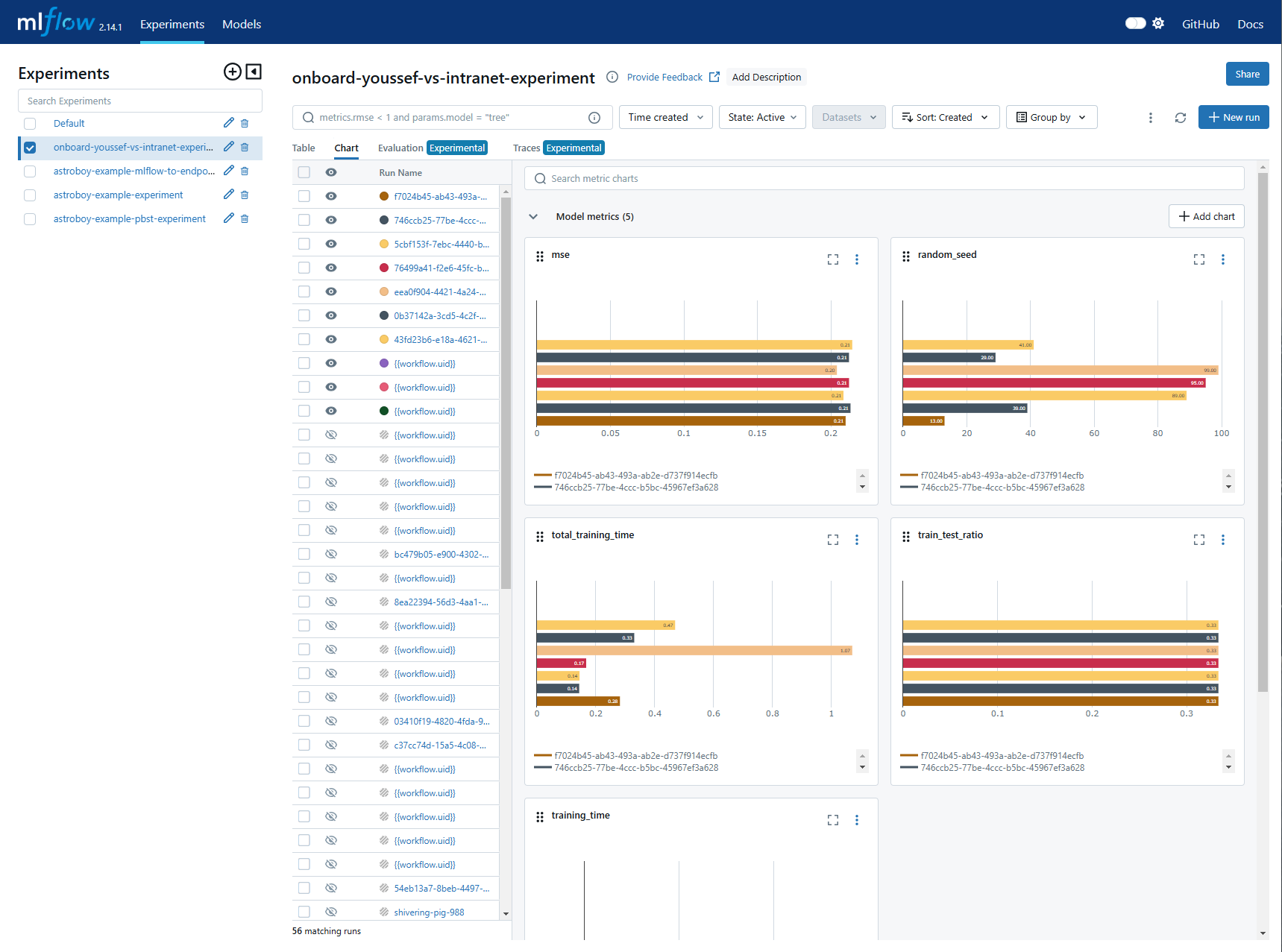
In the Kubeflow dashboard, click the MLflow tab to access the MLflow UI. You'll be prompted to log in with your credentials.
Explore Your Registered Models
In the MLflow UI, you can view:
- Registered model versions
- Experiment runs and their metrics
- Training parameters and artifacts
- Model lifecycle stages (Development, Staging, Production)
- Links to Kubeflow runs
Understanding Pipeline Variables
Configuration Variables
Your pipeline uses several configuration variables to customize behavior:
Pipeline configuration variables
run_id = RUN_ID_PLACEHOLDER              # Unique Kubeflow run identifier
pipeline_version = get_local_pipeline_version()  # Git-based version
region = 'eu-central-1'                   # AWS region
environment = 'test'                      # Environment stage
product = 'ai-lab'                        # Product name
profile = 'astroboy'                      # Kubernetes namespace
pipeline_name = 'onboard-youssef-vs-intranet'  # Pipeline name
Using CAIP Configuration
Read variables from CAIP config automatically
Instead of hardcoding values, retrieve them from the CAIP platform configuration:
pipeline_name = caip.pipeline_config.name
environment = caip.cd4ml_config.stage.value
profile = caip.cd4ml_config.namespace
region = caip.cd4ml_config.region.value
product = caip.cd4ml_config.product_name
This approach is more maintainable and handles environment-specific configurations automatically.
Extras to MLflow
MLflow is an open-source platform that manages the complete machine learning lifecycle. It provides comprehensive tools for tracking experiments, packaging code, versioning models, and managing model deployments across different environments.
Core Components
MLflow Tracking
Tracks experiments by logging parameters, metrics, and artifacts:
- Parameters: Hyperparameters used in training
- Metrics: Performance indicators (accuracy, loss, MSE, etc.)
- Artifacts: Model binaries, plots, and data files
- Run Metadata: Timestamps, code versions, and user information
Example usage:
import mlflow

with mlflow.start_run():
    mlflow.log_param("alpha", 0.5)
    mlflow.log_metric("rmse", 0.75)
    mlflow.log_artifact("model.pkl")
MLflow Projects
Packages ML code in a standardized format for reproducibility:
- MLproject File: YAML configuration defining project structure
- Conda Environment: Specifies all dependencies
Example MLproject:
name: MyProject
conda_env: conda.yaml
entry_points:
  main:
    parameters:
      alpha: {type: float, default: 0.5}
    command: "python train.py --alpha {alpha}"
MLflow Models
Packages trained models in multiple formats for diverse deployment:
- Python Function (pyfunc): Generic format for any Python model
- TensorFlow: TensorFlow-specific format
- Scikit-learn: Scikit-learn models
- XGBoost: XGBoost models
- ONNX: Interoperable format
Example:
import mlflow.sklearn
from sklearn.ensemble import RandomForestRegressor

model = RandomForestRegressor()
model.fit(X_train, y_train)
mlflow.sklearn.log_model(model, "model")
MLflow Registry
Manages model versions through their lifecycle:
- Model Registration: Register models for centralized management
- Versioning: Tracks different versions of the same model
- Stage Transitions: Move models through Development → Staging → Production
- Annotations: Add descriptions and metadata
Example:
import mlflow
from mlflow.models import Model

model_uri = "runs:/<run_id>/model"
model_version = mlflow.register_model(model_uri, "MyModel")

client = mlflow.tracking.MlflowClient()
client.transition_model_version_stage(
    name="MyModel",
    version=model_version.version,
    stage="Staging"
)
MLflow Integration and Compatibility
MLflow integrates seamlessly with popular ML frameworks and platforms:
Supported frameworks and deployment targets
ML Frameworks:
- TensorFlow and Keras
- PyTorch
- Scikit-learn
- XGBoost (used in your pipeline)
- LightGBM
Deployment Targets:
- REST APIs: Deploy as RESTful services for real-time predictions
- Cloud Services: AWS SageMaker, Azure ML, Google Cloud AI Platform
- Edge Devices: Deploy lightweight models for on-device inference
- Kubernetes: Container-based deployment
Your pipeline now automatically registers models in MLflow, tracks experiments, and manages model versions across your complete ML workflow!