Staging
Overview
A stage, staging or pre-production environment in CAIP functions more like a workflow or pipeline for managing MLflow models throughout their lifecycle. It provides a systematic approach to validate, test, and promote models from development to production readiness.
The primary use of a staging environment is to test all the installation/configuration/migration scripts and procedures before they're applied to a production environment. This ensures all major and minor upgrades to a production environment are completed reliably, without errors, and in a minimum of time. Another important use of staging is performance testing, particularly load testing, as this is often sensitive to the environment.
- Staging
What is Staging Concept?
The staging concept of Managed CAIP draws two staging directions.
Horizontal Staging for the Platform Infrastructure
Horizontal staging for the platform itself, where the staging environment resembles the full infrastructure exactly as it will be deployed to production after it was properly tested on staging. The platform itself will be validated under load in the TEST environment using exemplary "Contoso" use cases.
Vertical Staging for the Use Cases
Vertical staging is used by the use cases to stage your business logic, deployed on productive platform infrastructure. You can leverage the productive deployment of the platform to create TEST pipelines, resulting in TEST models, and promote or replicate them as PROD pipelines and PROD models on the same infrastructure tier.
Important: Naming Convention
Vertical staging relies on a naming convention for your pipelines. You must prefix your pipeline names with TEST or PROD to clearly identify which stage they belong to.
This naming convention ensures clarity in your workflows and helps distinguish between development/testing and production workloads within the same infrastructure.
For additional resources that are not part of the CAIP offering, you can create as many environments as needed and stage your resources using common CI/CD strategies and software engineering best practices.
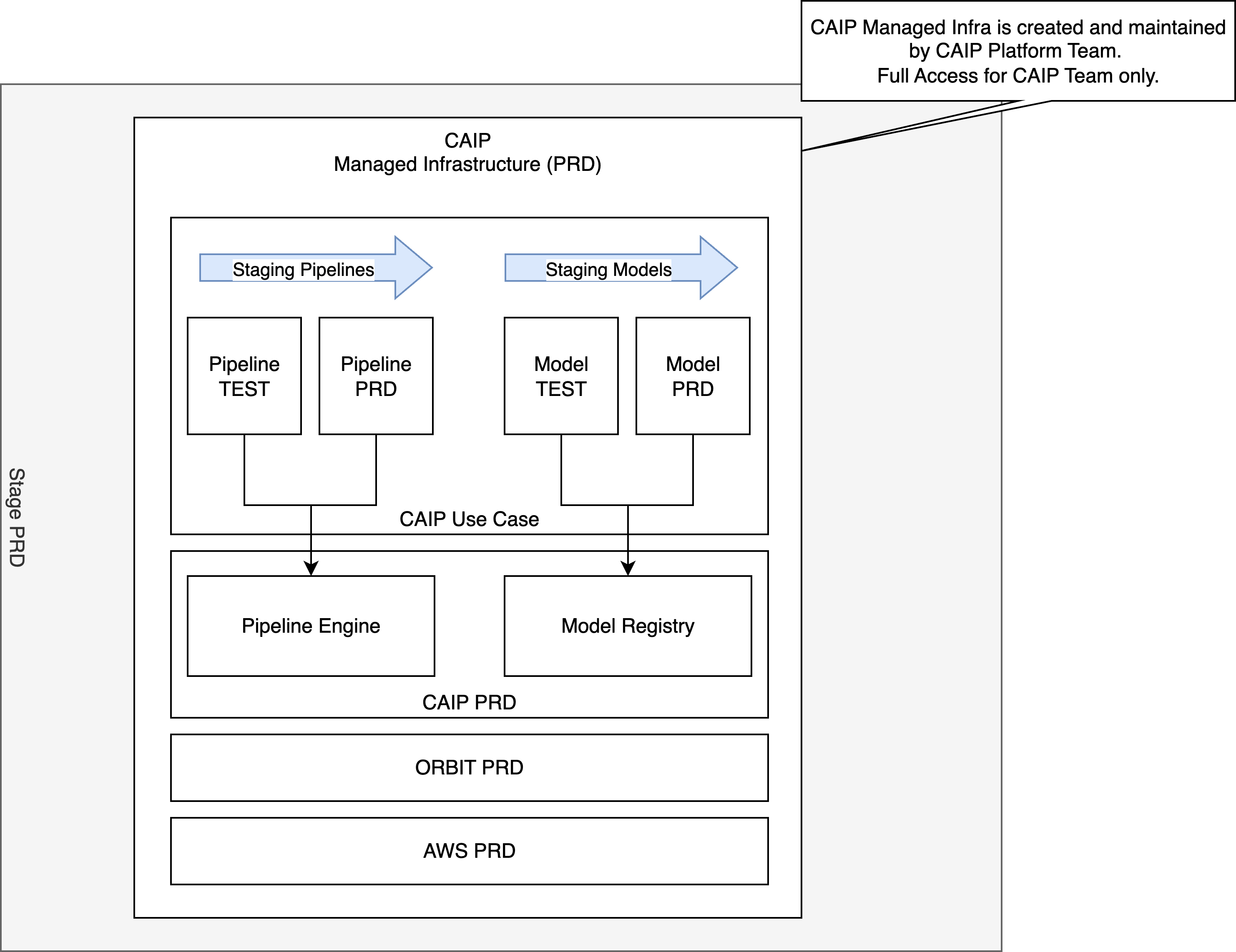
Staging capabilities of MLFlow & Kubeflow Pipeline
Important: MLflow Aliases Migration
This example has been updated to use MLflow Model Aliases instead of the deprecated stages system. The alias mapping is:
- "test" (models ready for production validation, replaces "Staging")
- "prod" (models currently in production, replaces "Production")
- "retire" (retired models, replaces "Archived")
MLflow stages will be completely removed in MLflow 3.0, so this example provides a future-proof implementation.
The MLflow Staging Model example demonstrates a comprehensive model staging workflow that implements intelligent alias-based deployment with conditional execution. This example showcases how to use MLflow's modern alias system with Kubeflow Pipeline to create a robust, automated model deployment process that is future-proof for MLflow 3.0.
Architecture Overview
The pipeline implements a unified design that conditionally executes different workflows based on the mlflow_stage configuration, with intelligent GitHub Actions integration for automated CI/CD deployment.
Kubeflow Pipeline Architecture
GitHub CI/CD Workflow Architecture
Example Overview
For example details, see mlflow_staging_model.
The staging process implements a unified pipeline architecture that conditionally executes different workflows based on environment configuration:
Unified Pipeline Design
The example uses a single pipeline file that handles multiple environments through conditional execution:
- TEST Environment (
mlflow_stage = "test"): Model development, training, and initial promotion with "test" alias - PROD Environment (
mlflow_stage = "prod"): Final validation and automated promotion to "prod" alias
The pipeline configuration uses separate environment entries:
# config/config.yaml
pipelines:
  prod-with-mlflow-stage-test:
    title: "TEST Example MLflow Staging Model"
    path: "ml_pipelines/mlflow_staging_model/pipeline.py:ml_pipeline"
    on_update: "ml_pipelines/mlflow_staging_model/pipeline.py:upload_data"
    tags:
      - Training
      - MLflow
      - Staging

  prod-with-mlflow-stage-prod:
    title: "PROD Example MLflow Staging Model"
    path: "ml_pipelines/mlflow_staging_model/pipeline.py:ml_pipeline"
    on_update: "ml_pipelines/mlflow_staging_model/pipeline.py:upload_data"
    tags:
      - Validation

extra_config:
  prod-with-mlflow-stage-test:
    mlflow_stage: test
  prod-with-mlflow-stage-prod:
    mlflow_stage: prod
Three-Stage Model Lifecycle
-
Training & Initial Assessment (TEST Environment):
- Loads development data (
test.csv) - Trains XGBoost regression model with MLflow logging
- Evaluates new model against current "prod" alias baseline
- Conditionally assigns "test" alias to promising models
- Loads development data (
-
Alias Assignment:
- Models that outperform "prod" alias baseline are assigned "test" alias
- Underperforming models are immediately assigned "retire" alias
- Provides gate for production-data validation
-
Final Validation (PROD Environment):
- Loads production data (
prod.csv) - Compares "test" alias model against "prod" alias model on production data
- Automatically promotes "test" to "prod" alias or retires based on performance
- Ready for KServe deployment
- Loads production data (
Smart Conditional Execution
The workflow implements intelligent resource optimization:
- Efficient Resource Usage: Only runs necessary pipeline steps
- Conditional CI/CD: Skips KServe deployment for retired models
- Automated Decision Making: No manual intervention required
- Cost Optimization: Avoids unnecessary compute for poor-performing models
The CI/CD workflow uses enhanced GitHub Actions integration with MLflow alias tracking:
# .github/workflows/deploy-mlflow-staging-model-example.yaml
- name: Record Initial test alias model version
  id: initial-test
  uses: ./.github/actions/check-mlflow
  with:
    alias: test

- name: Run TEST Pipeline
  run: |
    caip --env prod-with-mlflow-stage-test pipeline run prod-with-mlflow-stage-test --wait-for-completion

- name: Check if model reached test alias
  id: check-test
  uses: ./.github/actions/check-mlflow
  with:
    alias: test

- name: Run PROD Pipeline
  if: steps.check-test.outputs.has_model == 'true'
  run: |
    caip --env prod-with-mlflow-stage-prod pipeline run prod-with-mlflow-stage-prod --wait-for-completion

- name: Deploy MLflow Model to KServe
  if: steps.check-production.outputs.has_model == 'true'
  uses: ./.github/actions/deploy-mlflow-model
  with:
    model-label: prod
    model-uri: ${{ steps.check-production.outputs.model_uri }}
This automated workflow ensures that only validated, high-performing models reach the production environment, maintaining system reliability and performance standards while optimizing resource usage.
Implementation Insights
Data Loading Component
This component automatically loads the appropriate dataset based on the environment:
- TEST Environment: Loads
test.csvfor model development and training - PROD Environment: Loads
prod.csvfor production-like validation - Handles data preprocessing including categorical target conversion for regression
- Uploads processed data to S3 for pipeline processing
Click to expand Data Loading Component code
@pipeline_logging_config()
def load_data(data_s3_path: str, output_s3_key: str, mlflow_stage: str) -> str:
    """
    Load data from the specified S3 path.

    Args:
        data_s3_path: S3 path to the data file to be loaded
        output_s3_key: S3 key where the loaded data will be stored
        mlflow_stage: The MLflow stage (test or prod) for logging purposes

    Returns:
        str: S3 path to the loaded data
    """
    logging.info(f"Loading data for mlflow_stage: {mlflow_stage}")

    # Load data from the provided S3 path
    s3, s3_path = resource("s3"), S3Path(data_s3_path)

    logging.info(f"Loading data from: {s3_path}")

    try:
        raw_data = s3.Object(s3_path.bucket, s3_path.key).get()["Body"]
        data_df = read_csv(raw_data)
        logging.info(f"Successfully loaded data with {len(data_df)} rows and {len(data_df.columns)} columns")
    except Exception as e:
        logging.error(f"Failed to load data from {s3_path}: {e}")
        raise

    # Write the loaded data to the output location
    output_s3_path = f"{output_s3_key}/loaded_data.csv"
    logging.info(f"Writing data to: {output_s3_path}")

    return write_data_frame_to_s3(data_df, output_s3_path)
Training Component (TEST Environment Only)
Key features:
- Trains XGBoost regression model with configurable parameters
- Implements categorical target mapping (M=0, F=1, I=2) for Abalone dataset
- Logs comprehensive metrics (MSE) and model artifacts to MLflow
- Creates MLflow experiment links with Kubeflow run tracking
- Adds MSE as model version tag for easy viewing in MLflow UI
- Handles experiment creation and deletion scenarios gracefully
Click to expand Training Component code
@pipeline_logging_config()
def train(
    pipeline_name: str,
    pipeline_version: str,
    model_name: str,
    run_id: str,
    data_s3_path: str,
    environment: str,
    profile: str,
    region: str,
    product: str,
    mlflow_stage: str,
) -> TrainedModel:
    """Train model and register with MLflow"""
    mlflow_client = MlflowClient()
    logging.basicConfig(level=logging.INFO)

    # Log mlflow_stage for debugging
    logging.info(f"Training model for mlflow_stage: {mlflow_stage}")
    logging.info(f"Loading data from: {data_s3_path}")
    kubeflow_run_link = (
        f"https://cd4ml.{region}.{environment}.{product}.connected.bmw/_/"
        f"pipeline/?ns={profile}#/runs/details/{run_id}"
    )

    # Start run in MLflow - handle deleted experiment case
    experiment_name = f"{pipeline_name}-experiment"
    try:
        set_experiment(experiment_name=experiment_name)
        logging.info(f"Using existing experiment: {experiment_name}")
    except Exception as e:
        logging.warning(f"Failed to set experiment {experiment_name}: {e}")
        logging.info(f"Creating new experiment: {experiment_name}")
        # Create new experiment (this will automatically set it as active)
        from mlflow import create_experiment
        try:
            experiment_id = create_experiment(experiment_name)
            logging.info(f"Created new experiment with ID: {experiment_id}")
        except Exception as create_error:
            logging.error(f"Failed to create experiment: {create_error}")
            # Fallback to default experiment
            set_experiment(experiment_name="Default")
            logging.warning("Using Default experiment as fallback")
    with start_run(
        run_name=run_id,
        tags={"pipeline_name": pipeline_name, "pipeline_version": pipeline_version, "mlflow_stage": mlflow_stage},
        description=f"[Kubeflow Run]({kubeflow_run_link})",
    ) as run:
        # Load and preprocess data
        data_df = read_csv(data_s3_path)
        logging.info(f"Loaded data with shape: {data_df.shape}")
        logging.info(f"Data columns: {list(data_df.columns)}")
        logging.info(f"Target column unique values: {data_df['sex'].unique() if 'sex' in data_df.columns else 'No sex column'}")

        # Convert categorical target to numeric for regression
        if 'sex' in data_df.columns:
            # Map M=0, F=1, I=2 for regression
            sex_mapping = {'M': 0, 'F': 1, 'I': 2}
            data_df['sex'] = data_df['sex'].map(sex_mapping)
            logging.info(f"Converted sex column to numeric: {data_df['sex'].unique()}")

        train_test_ratio, mse, random_seed = fit_xgboost(data_df, model_name)
        model_version_s3_path = f"{get_artifact_uri()}/{model_name}/model.bst"

    # Get MLflow model version
    model_versions = mlflow_client.search_model_versions(
        filter_string=f"name = '{model_name}' and run_id = '{run.info.run_id}'"
    )
    if not model_versions:
        raise ValueError(f"No model version found for {model_name} with run_id {run.info.run_id}")
    model_version = model_versions[0].version

    # Add Kubeflow run link and MSE to model version
    mlflow_client.update_model_version(
        name=model_name,
        version=model_version,
        description=f"[Kubeflow Run]({kubeflow_run_link})",
    )

    # Add MSE as a tag to the model version for easy viewing
    mlflow_client.set_model_version_tag(
        name=model_name,
        version=model_version,
        key="mse",
        value=str(mse)
    )

    # Add outputs to Kubeflow UI
    mlflow_model_version_link = (
        f"https://mlflow.{region}.{environment}.{product}.connected.bmw/"
        f"{profile}/#/models/{model_name}/versions/{model_version}"
    )

    return TrainedModel(
        train_test_ratio,
        mse,
        random_seed,
        model_version,
        mlflow_model_version_link,
        model_version_s3_path,
    )
Evaluation Component (TEST Environment Only)
Implements intelligent promotion decision logic using MLflow aliases:
- Compares new model's MSE against current "prod" alias model
- Returns
should_promoteboolean for conditional alias assignment - Handles edge cases (no prod alias model, metric retrieval failures)
- Provides detailed evaluation messages for debugging
Click to expand Evaluation Component code
@pipeline_logging_config()
def evaluate_model(
    model_name: str,
    model_version: str,
    environment: str,
    profile: str,
    region: str,
    product: str,
) -> NamedTuple(
    "EvaluationResult",
    [
        ("should_promote", str),
        ("current_mse", float),
        ("production_mse", float),
        ("evaluation_message", str),
    ],
):
    """
    Evaluate the trained model against the current production model.

    This component compares the MSE of the newly trained model with the current
    production model. If the new model has better (lower) MSE, it should be promoted.

    Args:
        model_name: Name of the model
        model_version: Version of the newly trained model
        environment: Environment (test/prod)
        profile: Namespace/profile
        region: AWS region
        product: Product name

    Returns:
        NamedTuple with evaluation results
    """
    mlflow_client = MlflowClient()
    logging.info(f"Evaluating model {model_name} version {model_version}")

    # Get the current model's MSE from MLflow
    current_model = mlflow_client.get_model_version(model_name, model_version)
    current_mse = None

    # Try to get MSE from the model's run
    try:
        run = mlflow_client.get_run(current_model.run_id)
        current_mse = run.data.metrics.get("mse")
        logging.info(f"Current model MSE: {current_mse}")
    except Exception as e:
        logging.warning(f"Could not get MSE for current model: {e}")
        current_mse = float('inf')  # Default to worst case

    # Get the production model's MSE using alias
    production_mse = float('inf')  # Default to worst case
    production_model_version = None

    try:
        # Find the current production model using "prod" alias
        production_model_version = mlflow_client.get_model_version_by_alias(
            name=model_name,
            alias="prod"
        )

        if production_model_version:
            production_run = mlflow_client.get_run(production_model_version.run_id)
            production_mse = production_run.data.metrics.get("mse", float('inf'))
            logging.info(f"prod alias model version {production_model_version.version} MSE: {production_mse}")
        else:
            logging.info("No prod alias model found, new model will be promoted")
    except Exception as e:
        logging.warning(f"Could not get prod alias model MSE: {e}")
        # If alias doesn't exist, treat as no production model

    # Determine if model should be promoted
    should_promote = current_mse is not None and current_mse < production_mse

    if should_promote:
        evaluation_message = (
            f"Model should be promoted to prod. "
            f"Current MSE: {current_mse:.4f}, prod MSE: {production_mse:.4f}"
        )
        logging.info(f"PROMOTION RECOMMENDED: {evaluation_message}")
    else:
        evaluation_message = (
            f"Model should NOT be promoted to prod. "
            f"Current MSE: {current_mse:.4f}, prod MSE: {production_mse:.4f}"
        )
        logging.info(f"PROMOTION NOT RECOMMENDED: {evaluation_message}")

    # Create response tuple
    from collections import namedtuple
    response = namedtuple(
        "EvaluationResult",
        ["should_promote", "current_mse", "production_mse", "evaluation_message"]
    )

    return response(
        should_promote=str(should_promote),
        current_mse=current_mse,
        production_mse=production_mse,
        evaluation_message=evaluation_message
    )
Model Registration Component (TEST Environment Only)
- Conditionally assigns aliases to models based on evaluation results
- Uses MLflow's modern alias system: "test", "prod", or "retire"
- Provides MLflow UI links for model inspection
- Integrates with Kubeflow conditional execution
Click to expand Model Registration Component code
@pipeline_logging_config()
def register_model(
    model_name: str,
    model_version: str,
    alias: str,
    environment: str,
    profile: str,
    region: str,
    product: str,
) -> str:
    """
    Register model with a specific alias in MLflow.

    This component assigns an alias to a model version using MLflow's alias system.
    The alias mapping is: test -> "test", prod -> "prod", retire -> "retire"

    Args:
        model_name: Name of the model
        model_version: Version of the model to register
        alias: Target alias (test, prod, or retire)
        environment: Environment (test/prod)
        profile: Namespace/profile
        region: AWS region
        product: Product name

    Returns:
        str: MLflow model version link
    """
    mlflow_client = MlflowClient()
    logging.info(f"Setting alias '{alias}' for model {model_name} version {model_version}")

    try:
        # Check if alias already exists and delete it to avoid conflicts
        try:
            existing_model_version = mlflow_client.get_model_version_by_alias(
                name=model_name,
                alias=alias
            )
            if existing_model_version:
                logging.info(f"Deleting existing alias '{alias}' from version {existing_model_version.version}")
                mlflow_client.delete_registered_model_alias(
                    name=model_name,
                    alias=alias
                )
        except Exception as e:
            logging.info(f"No existing alias '{alias}' found, proceeding with assignment: {e}")

        # Set the new alias
        mlflow_client.set_registered_model_alias(
            name=model_name,
            alias=alias,
            version=model_version
        )

        # Get the updated model version
        model = mlflow_client.get_model_version(model_name, model_version)

        logging.info(
            f"Successfully set alias '{alias}' for model: {model_name}, "
            f"Version: {model.version}"
        )

        # Create MLflow model version link
        mlflow_model_version_link = (
            f"https://mlflow.{region}.{environment}.{product}.connected.bmw/"
            f"{profile}/#/models/{model.name}/versions/{model.version}"
        )

        logging.info(f"Model registered successfully with alias '{alias}'. Link: {mlflow_model_version_link}")

        return mlflow_model_version_link

    except Exception as e:
        logging.error(f"Failed to set alias '{alias}' for model: {e}")
        raise
Test vs Production Validation (PROD Environment Only)
This is the final validation component that uses MLflow aliases:
- Compares "test" and "prod" alias models on
prod.csvdata - Implements automatic promotion/retirement workflow using aliases
- Handles model loading and evaluation for both aliases
- Provides comprehensive validation reporting with clean alias transitions
Click to expand Test vs Production Validation code
@pipeline_logging_config()
def validate_test_vs_prod(
    model_name: str,
    validation_data_s3_path: str,
    environment: str,
    profile: str,
    region: str,
    product: str,
) -> ValidationResult:
    """
    Compare test and prod models on prod.csv data using MLflow aliases.

    This component:
    1. Gets the latest "test" and "prod" models from MLflow using aliases
    2. Evaluates both models on prod.csv data
    3. Compares MSE values to decide promotion or retirement
    4. If test MSE < prod MSE: promote test to prod
    5. If prod MSE < test MSE: retire test model

    Args:
        model_name: Name of the model
        validation_data_s3_path: S3 path to validation data (prod.csv)
        environment: Environment (prod)
        profile: Namespace/profile
        region: AWS region
        product: Product name

    Returns:
        NamedTuple with validation results and promotion decision
    """
    mlflow_client = MlflowClient()
    logging.info(f"Comparing test vs prod models for: {model_name}")

    # Get model versions using aliases
    try:
        # Get test model using "test" alias
        try:
            test_model_version_obj = mlflow_client.get_model_version_by_alias(
                name=model_name,
                alias="test"
            )
            test_model_version = test_model_version_obj.version
            logging.info(f"Found test model version: {test_model_version}")
        except Exception as e:
            raise ValueError(f"No test model found for {model_name}: {e}")

        # Get prod model using "prod" alias
        try:
            prod_model_version_obj = mlflow_client.get_model_version_by_alias(
                name=model_name,
                alias="prod"
            )
            prod_model_version = prod_model_version_obj.version
            logging.info(f"Found prod model version: {prod_model_version}")
        except Exception as e:
            logging.warning(f"No prod model found for {model_name}, will promote test model directly: {e}")
            prod_model_version = None
            prod_model_version_obj = None

    except Exception as e:
        error_msg = f"Failed to get model versions: {e}"
        logging.error(error_msg)
        raise ValueError(error_msg)

    # Load validation data
    try:
        validation_df = read_csv(validation_data_s3_path)
        logging.info(f"Loaded validation data with shape: {validation_df.shape}")

        # Convert categorical target to numeric for regression (same as training)
        if 'sex' in validation_df.columns:
            sex_mapping = {'M': 0, 'F': 1, 'I': 2}
            validation_df['sex'] = validation_df['sex'].map(sex_mapping)
            logging.info(f"Converted sex column to numeric: {validation_df['sex'].unique()}")

        # Split features and target
        val_x, val_y = features_target_split(validation_df)

    except Exception as e:
        error_msg = f"Failed to load validation data: {e}"
        logging.error(error_msg)
        raise ValueError(error_msg)

    # Load and evaluate test model
    try:
        test_model_uri = f"models:/{model_name}@test"
        import mlflow.xgboost
        test_model = mlflow.xgboost.load_model(test_model_uri)

        test_predictions = test_model.predict(val_x)
        test_mse = mean_squared_error(val_y, test_predictions)

        logging.info(f"Test model MSE: {test_mse:.4f}")

    except Exception as e:
        error_msg = f"Failed to evaluate test model: {e}"
        logging.error(error_msg)
        raise ValueError(error_msg)

    # Load and evaluate prod model (if exists)
    prod_mse = float('inf')  # Default if no prod model

    if prod_model_version:
        try:
            prod_model_uri = f"models:/{model_name}@prod"
            prod_model = mlflow.xgboost.load_model(prod_model_uri)

            prod_predictions = prod_model.predict(val_x)
            prod_mse = mean_squared_error(val_y, prod_predictions)

            logging.info(f"Prod model MSE: {prod_mse:.4f}")

        except Exception as e:
            error_msg = f"Failed to evaluate prod model: {e}"
            logging.error(error_msg)
            raise ValueError(error_msg)
    else:
        logging.info("No prod model exists, test will be promoted")

    # Make promotion/retirement decision
    should_promote_test = test_mse < prod_mse

    if should_promote_test:
        action_taken = "promote_test_to_prod"
        validation_message = (
            f"PROMOTE TEST TO PROD: "
            f"Test model (v{test_model_version}) MSE: {test_mse:.4f} < "
            f"Prod model (v{prod_model_version or 'None'}) MSE: {prod_mse:.4f}. "
            f"Moving 'test' alias to 'prod' alias."
        )
        logging.info(validation_message)

        # Delete existing prod alias if it exists
        try:
            if prod_model_version:
                mlflow_client.delete_registered_model_alias(
                    name=model_name,
                    alias="prod"
                )
                logging.info(f"Deleted existing prod alias from version {prod_model_version}")
        except Exception as e:
            logging.info(f"No existing prod alias to delete: {e}")

        # Delete test alias since we're promoting it
        try:
            mlflow_client.delete_registered_model_alias(
                name=model_name,
                alias="test"
            )
            logging.info(f"Deleted test alias from version {test_model_version}")
        except Exception as e:
            logging.warning(f"Failed to delete test alias: {e}")

        # Promote test to prod
        try:
            mlflow_client.set_registered_model_alias(
                name=model_name,
                alias="prod",
                version=test_model_version
            )
            logging.info(f"Successfully promoted test model v{test_model_version} to prod")
        except Exception as e:
            logging.error(f"Failed to promote model: {e}")
            raise ValueError(f"Failed to promote model: {e}")

    else:
        action_taken = "retire_test_model"
        validation_message = (
            f"RETIRE TEST MODEL: "
            f"Test model (v{test_model_version}) MSE: {test_mse:.4f} >= "
            f"Prod model (v{prod_model_version}) MSE: {prod_mse:.4f}"
        )
        logging.warning(validation_message)

        # Delete test alias to retire the model
        try:
            mlflow_client.delete_registered_model_alias(
                name=model_name,
                alias="test"
            )
            logging.info(f"Deleted test alias from version {test_model_version}")
        except Exception as e:
            logging.warning(f"Failed to delete test alias: {e}")

        # Set "retire" alias for the retired model
        try:
            mlflow_client.set_registered_model_alias(
                name=model_name,
                alias="retire",
                version=test_model_version
            )
            logging.info(f"Successfully set retire alias for test model v{test_model_version}")
        except Exception as e:
            logging.error(f"Failed to set retire alias: {e}")
            raise ValueError(f"Failed to set retire alias: {e}")

    # Generate MLflow UI link
    mlflow_model_uri = f"https://mlflow.{region}.{environment}.{product}.connected.bmw/{profile}/#/models/{model_name}/versions/{test_model_version}"

    # Create response tuple
    response = ValidationResult(
        test_model_version=test_model_version,
        prod_model_version=prod_model_version or "None",
        test_mse=test_mse,
        prod_mse=prod_mse,
        should_promote_test=should_promote_test,
        action_taken=action_taken,
        validation_message=validation_message,
        mlflow_model_uri=mlflow_model_uri
    )

    return response
CI/CD Workflow Integration
The GitHub Actions workflow deploy-mlflow-staging-model-example.yaml implements a complete MLflow staging model pipeline with intelligent conditional execution. Here's a detailed breakdown of each step:
Environment Setup
Checkout Repository
- name: Checkout
  uses: actions/checkout@v4
Clones the repository to access pipeline code and configuration files.
Set Environment
- name: Set Environment
  uses: ./.github/actions/set-environment
  with:
    role-to-assume: <aws_role_arn>
    aws-region: <aws_region>
    cache-venv-key: <aws_cache_key>
Configures AWS credentials, sets up Python virtual environment, and installs dependencies.
EKS and MLflow Connection
Set Kubeconfig and Port Forward
- name: Set Kubeconfig and Port Forward
  shell: bash
  run: |
    aws eks update-kubeconfig --region <aws_region> --name <aws_cluster_name>
    kubectl get svc -n <eks_namespace> <mlflow_service_name>

    nohup kubectl port-forward -n <eks_namespace> svc/<mlflow_service_name> 5000:5000 > /tmp/port-forward.log 2>&1 &
    PORT_FORWARD_PID=$!
    echo "Port forward PID: $PORT_FORWARD_PID"

    for i in {1..30}; do
      if curl -s http://localhost:5000/health > /dev/null 2>&1; then
        echo "Port forward is ready!"
        break
      fi
      if [ $i -eq 30 ]; then
        echo "Port forward failed to start within 30 seconds"
        echo "Port forward log:"
        cat /tmp/port-forward.log
        exit 1
      fi
      echo "Attempt $i/30: waiting..."
      sleep 1
    done
Establishes connection to EKS cluster and sets up port forwarding to MLflow tracking server with retry logic and health checks.
Initial State Recording
Record Initial Test Alias Model Version
- name: Record Initial test alias model version
  id: initial-test
  uses: ./.github/actions/check-mlflow
  with:
    alias: test
Captures the current test alias model version before pipeline execution to detect changes later.
TEST Pipeline Execution
Run TEST Pipeline (Train/Evaluate/Register)
- name: Run TEST Pipeline (Train/Evaluate/Register)
  id: test-pipeline
  shell: bash
  env:
    GITHUB_TOKEN: ${{ github.token }}
  run: |
    source .venv/bin/activate
    caip --env prod-with-mlflow-stage-test pipeline run prod-with-mlflow-stage-test --wait-for-completion
Executes the TEST environment pipeline that includes training, evaluation, and conditional model registration.
Change Detection
Check Test Alias Model After TEST Pipeline
- name: Check test alias Model After TEST Pipeline
  id: check-test
  uses: ./.github/actions/check-mlflow
  with:
    alias: test
Queries MLflow to get the current test alias model state after TEST pipeline execution.
Check if Test Alias Model Was Updated
- name: Check if test alias Model Was Updated
  id: test-updated
  shell: bash
  run: |
          INITIAL_VERSION="${{ steps.initial-test.outputs.version }}"
          CURRENT_VERSION="${{ steps.check-test.outputs.version }}"
          INITIAL_HAS_MODEL="${{ steps.initial-test.outputs.has_model }}"
          CURRENT_HAS_MODEL="${{ steps.check-test.outputs.has_model }}"

          echo "Initial: has_model=$INITIAL_HAS_MODEL, version=$INITIAL_VERSION"
          echo "Current: has_model=$CURRENT_HAS_MODEL, version=$CURRENT_VERSION"

          if [ "$CURRENT_HAS_MODEL" = "true" ]; then
            if [ "$INITIAL_HAS_MODEL" != "true" ] || [ "$INITIAL_VERSION" != "$CURRENT_VERSION" ]; then
              echo "model_updated=true" >> $GITHUB_OUTPUT
              echo "Test alias model updated: $INITIAL_VERSION -> $CURRENT_VERSION"
            else
              echo "model_updated=false" >> $GITHUB_OUTPUT
              echo "No test alias model update detected"
            fi
          else
            echo "model_updated=false" >> $GITHUB_OUTPUT
            echo "No test alias model found after TEST pipeline"
          fi
Compares pre/post pipeline states to determine if a new model was assigned test alias.
PROD Pipeline (Conditional)
Compare Test vs Production (Promote/Retire)
- name: Compare Test vs Production (Promote/Retire)
  id: prod-validation
  if: steps.test-updated.outputs.model_updated == 'true'
  shell: bash
  env:
    GITHUB_TOKEN: ${{ github.token }}
  run: |
    source .venv/bin/activate
    caip --env prod-with-mlflow-stage-prod pipeline run prod-with-mlflow-stage-prod --wait-for-completion
Only runs if a new model was assigned test alias. Executes PROD validation pipeline that compares test vs prod alias models.
Production Model Check
Check Production Model
- name: Check Production model
  id: check-production
  if: steps.prod-validation.conclusion == 'success'
  uses: ./.github/actions/check-mlflow
  with:
    alias: prod
Queries MLflow to verify if a model was promoted to prod alias after PROD validation.
KServe Deployment (Conditional)
Deploy MLflow Model to KServe
- name: Deploy MLflow Model to KServe
  id: deploy-kserve
  if: steps.check-production.outputs.has_model == 'true'
  uses: ./.github/actions/deploy-mlflow-model
  with:
    model-label: prod
    model-uri: ${{ steps.check-production.outputs.model_uri }}
    model-version: ${{ steps.check-production.outputs.version }}
Only deploys to KServe if a prod alias model exists. Creates InferenceService with MLflow runtime.
Inference Testing Setup
Setup Port Forward for Inference Testing
- name: Setup Port Forward for Inference Testing
  id: setup-port-forward
  if: steps.deploy-kserve.conclusion == 'success'
  shell: bash
  run: |
    echo "Setting up port forwarding for inference testing..."
    echo "Finding the latest predictor service..."

    PREDICTOR_SERVICE=$(kubectl get svc -n <eks_namespace> | grep "$MODEL_NAME-predictor-.*-private" | sort | tail -1 | awk '{print $1}')

    if [ -z "$PREDICTOR_SERVICE" ]; then
      echo "No predictor service found for $MODEL_NAME"
      kubectl get svc -n <eks_namespace> | grep "$MODEL_NAME"
      exit 1
    fi

    echo "Found predictor service: $PREDICTOR_SERVICE"
    nohup kubectl port-forward -n <eks_namespace> svc/$PREDICTOR_SERVICE 8080:80 > /tmp/port-forward-inference.log 2>&1 &

    INFERENCE_PID=$!
    echo "Inference port forward PID: $INFERENCE_PID"

    for i in {1..30}; do
      if curl -s http://localhost:8080/health > /dev/null 2>&1; then
        echo "Inference port forward is ready!"
        break
      fi
      if [ $i -eq 30 ]; then
        echo "Inference port forward failed to start within 30 seconds"
        exit 1
      fi
      echo "Attempt $i/30: waiting for inference endpoint..."
      sleep 1
    done
Sets up port forwarding to the deployed KServe inference service with health checks.
Inference Endpoint Testing
Test Inference Endpoint
- name: Test Inference Endpoint
  id: test-inference-endpoint
  if: steps.setup-port-forward.conclusion == 'success'
  uses: ./.github/actions/test-inference-endpoint
Validates the deployed model by sending test predictions and verifying responses.