Project Settings
This guide covers project configuration, API key management, and team access control in Langfuse.
Accessing Settings
Navigate to Settings in the left sidebar after logging into Langfuse.
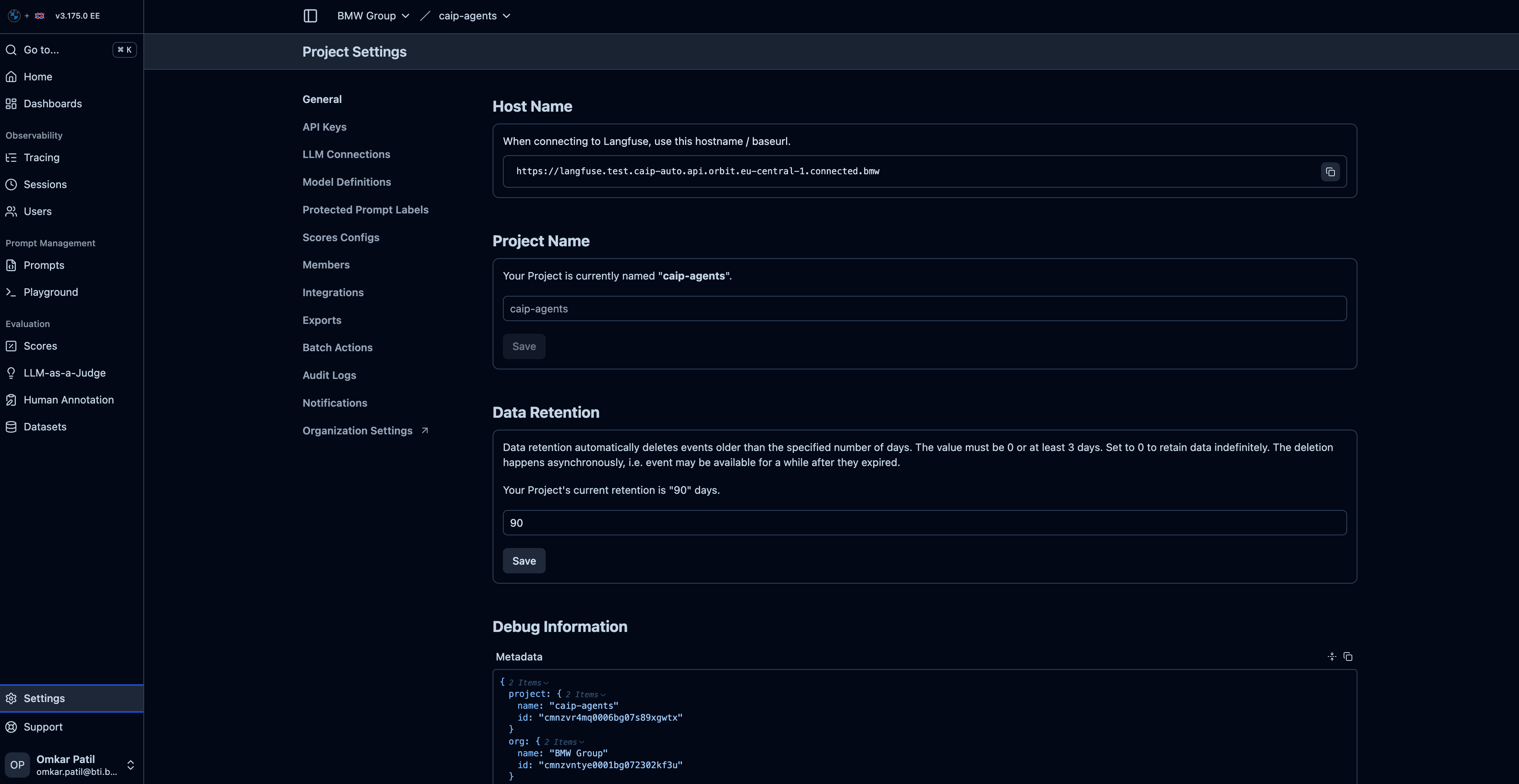
Project Configuration
General Settings
| Setting | Description |
|---|---|
| Project Name | Display name shown in the UI |
| Project ID | Unique identifier (read-only) |
| Created | Project creation date |
| Admin | Original project requester |
Environment Settings
Configure how your project handles different environments:
| Setting | Description |
|---|---|
| Default Environment | Environment tag applied when LANGFUSE_ENV is not set |
| Environment Filter | Default filter applied to trace views |
Retention Settings
Data retention policies for your project:
| Setting | Description |
|---|---|
| Trace Retention | How long traces are stored (e.g., 30 days, 90 days) |
| Generation Retention | How long generation data is kept |
| Session Retention | How long session data is maintained |
Retention settings are configured by the CAIP team based on your subscription. Contact CAIP support to modify retention policies.
API Keys
API keys authenticate your application with Langfuse. You need both keys to send traces.
Key Types
| Key Type | Prefix | Usage | Security |
|---|---|---|---|
| Public Key | pk-lf- | Identifies your project | Safe to embed in client-side code |
| Secret Key | sk-lf- | Authenticates API requests | Keep secret, never expose |
Creating API Keys
Only project Admins can create and manage API keys.
- Navigate to Settings → API Keys
- Click Create new API key
- Enter a descriptive name (e.g., "Production Server", "Dev Machine")
- Copy both keys immediately
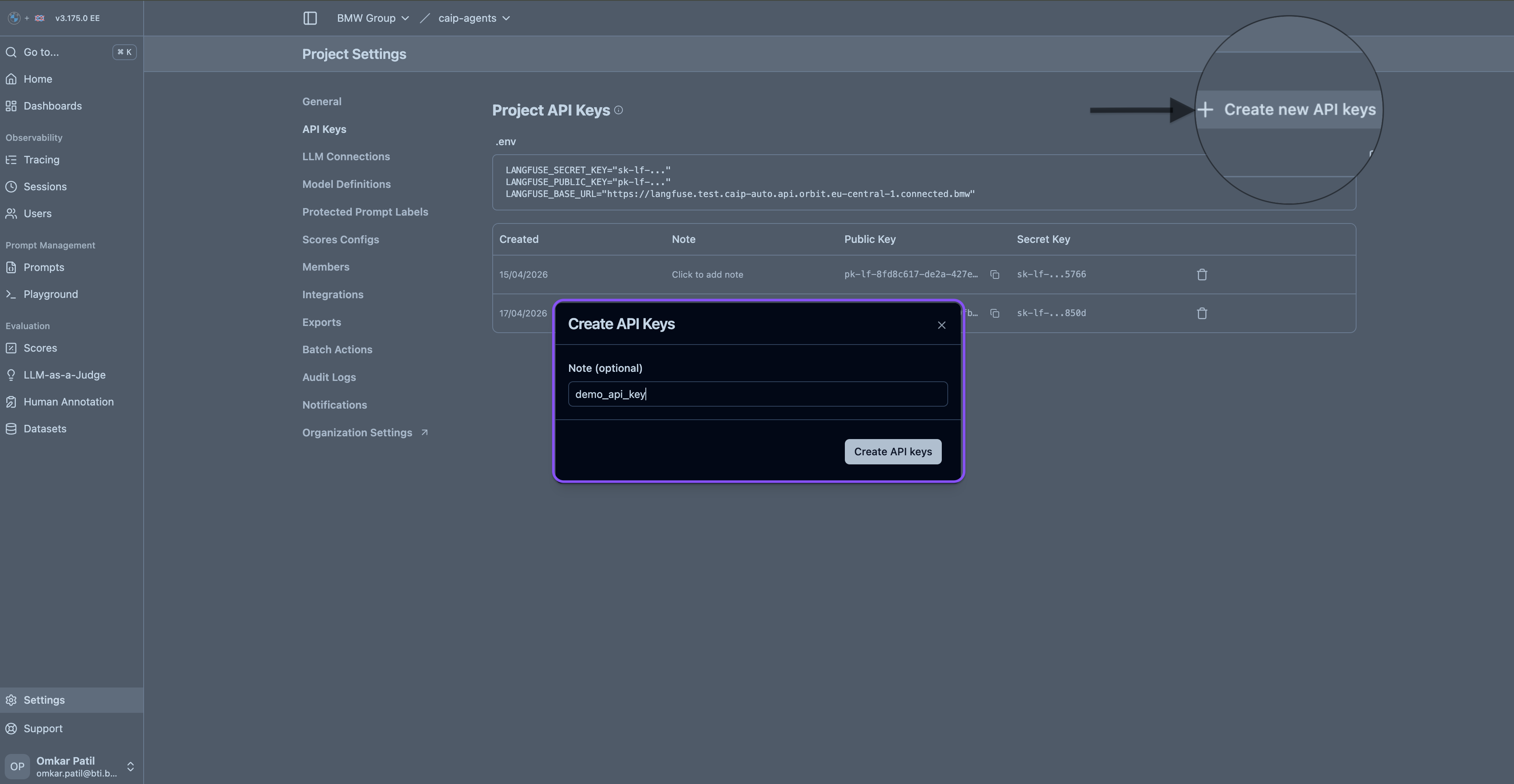
The secret key is displayed only at creation time. Store it securely:
- Use a password manager
- Store in a secrets vault (AWS Secrets Manager, HashiCorp Vault)
- Never commit to version control
API Key Best Practices
| Practice | Recommendation |
|---|---|
| Naming | Use descriptive names: prod-server-main, dev-local |
| Rotation | Rotate keys periodically (every 90 days recommended) |
| Separation | Use different keys for different environments |
| Least Privilege | Create keys only when needed |
Rotating API Keys
To rotate a key without downtime:
- Create a new API key
- Update your application to use the new key
- Deploy the change
- Verify traces are flowing
- Delete the old key
Using API Keys in Your Application
# Langfuse API Keys
LANGFUSE_PUBLIC_KEY=pk-lf-xxxxxxxx-xxxx-xxxx-xxxx-xxxxxxxxxxxx
LANGFUSE_SECRET_KEY=sk-lf-xxxxxxxx-xxxx-xxxx-xxxx-xxxxxxxxxxxx
# ROW
LANGFUSE_HOST=https://langfuse.caip.bmw.cloud

# CN
# LANGFUSE_HOST=https://langfuse.caip.bmwchina.cloud

# Optional: disable Langfuse observability
# CAIP_LANGFUSE_OBSERVABILITY=false
import os
from dotenv import load_dotenv

load_dotenv()

# SDK reads from environment variables automatically
# No need to pass keys explicitly
Security Recommendations
- ❌ Don't commit
.envfiles to git - ❌ Don't log API keys
- ❌ Don't include in client-side code
- ❌ Don't share keys via email/chat
- ✅ Use environment variables
- ✅ Use AWS Secrets Manager
- ✅ Use HashiCorp Vault
- ✅ Use Kubernetes Secrets
Team Management
Roles and Permissions
| Role | View Traces | Create Traces | Manage Settings | Manage Members | Delete Project |
|---|---|---|---|---|---|
| Viewer | ✅ | ❌ | ❌ | ❌ | ❌ |
| Member | ✅ | ✅ | ❌ | ❌ | ❌ |
| Admin | ✅ | ✅ | ✅ | ✅ | ✅ |
Admin Capabilities
As a project Admin, you can:
- Create API Keys: Generate new keys for applications
- Invite Members: Add team members with specific roles
- Promote Members: Elevate Members to Admin status
- Remove Access: Revoke team member access
- Manage Settings: Configure project options
- Delete Project: Remove the project entirely
Inviting Team Members
- Navigate to Settings → Members
- Click Invite Member
- Enter the BMW email address
- Select a role (Admin, Member, or Viewer)
- Click Send Invite
The invited user will receive an email and can access the project after logging in with their BMW WebEAM credentials.
Admin Promotion Flow
Removing Team Members
- Navigate to Settings → Members
- Find the member to remove
- Click the Remove button
- Confirm the action
Removing a member immediately revokes their access. They will not be able to view traces or send data.
Model Pricing Configuration
Configure custom pricing for cost calculations.
Default Pricing
Langfuse includes default pricing for common models:
- OpenAI GPT-4, GPT-3.5
- Anthropic Claude
- Other popular models
Custom Pricing
For custom or self-hosted models:
- Navigate to Settings → Model Pricing
- Click Add Custom Model
- Enter model details:
| Field | Description |
|---|---|
| Model Name | Exact model identifier used in traces |
| Input Price | Cost per 1K input tokens |
| Output Price | Cost per 1K output tokens |
Example Custom Pricing
{
  "model_name": "custom-llama-70b",
  "input_price_per_1k": 0.001,
  "output_price_per_1k": 0.002
}
Data Export
Export Options
| Format | Use Case |
|---|---|
| JSON | Programmatic processing |
| CSV | Spreadsheet analysis |
| API | Automated data retrieval |
Export via API
from langfuse import Langfuse

client = Langfuse()

# Export traces
traces = client.get_traces(
    page=1,
    limit=100,
    from_timestamp="2024-01-01T00:00:00Z"
)

# Export generations
generations = client.get_generations(
    page=1,
    limit=100
)
Project Deletion
Deleting a project permanently removes all:
- Traces
- Generations
- Sessions
- API Keys
- Settings
This action cannot be undone.
To delete a project:
- Navigate to Settings → Danger Zone
- Type the project name to confirm
- Click Delete Project
Troubleshooting
Common Issues
| Issue | Solution |
|---|---|
| Invalid API Key | Verify keys match exactly, check for extra spaces |
| Permission Denied | Confirm your role has necessary permissions |
| Key Not Working | Check if key was deleted or rotated |
| Cannot Create Key | Only Admins can create API keys |
Getting Help
If you encounter issues:
- Check this documentation
- Contact CAIP support via the portal
- Reach out to your project Admin
Next Steps
- Tracing Guide — Deep dive into trace instrumentation
- Users & Sessions — Track user activity and conversations
- Best Practices — Production-ready patterns