Tracing Guide
This comprehensive guide covers everything about tracing in Langfuse — from instrumenting your code to analyzing traces in the dashboard.
Understanding Traces
A trace represents a complete execution of your application — from receiving a user request to returning a response. Traces contain nested observations that show each step of the execution.
Trace Structure
Trace: "handle_user_message"
│
├── Observation (Span): "validate_input"
│   └── Duration: 12ms
│
├── Observation (Span): "retrieve_context"
│   ├── Observation (Span): "embed_query"
│   │   └── Duration: 80ms
│   └── Observation (Span): "vector_search"
│       └── Duration: 150ms
│
├── Observation (Generation): "gpt-4o"
│   ├── Input: 1,456 tokens
│   ├── Output: 342 tokens
│   ├── Cost: $0.0234
│   └── Duration: 890ms
│
└── Observation (Span): "format_response"
    └── Duration: 25ms
SDK Auto-Generated Trace Structure
When using the CAIP Agents SDK, the following structure is created automatically:
Trace (tags, user_id, session_id, input, output)
│
├── Generation: "caip.pydantic_ai.run" [model=gpt-4o]
│   ├── Input: user prompt
│   ├── Output: model response
│   ├── Token Usage & Cost
│   ├── Tool: "caip.tool.search_database"
│   └── Span: "caip.api.create_message"
│
└── (or "caip.pydantic_ai.stream" / "caip.pydantic_ai.iter" for streaming)
The SDK names generations as caip.{framework}.{method}:
| Name | Framework | Method |
|---|---|---|
caip.pydantic_ai.run | PydanticAI | Synchronous run |
caip.pydantic_ai.stream | PydanticAI | Streaming |
caip.pydantic_ai.iter | PydanticAI | Iterative |
caip.langchain.run | LangChain | Invoke |
caip.langchain.stream | LangChain | Streaming |
Core Concepts
| Concept | Description |
|---|---|
| Trace | The root container for a complete execution |
| Observation | An individual operation within a trace |
| Span | A general-purpose observation for any operation |
| Generation | An LLM call with token counts and costs |
| Event | A point-in-time occurrence (log-like) |
Viewing Traces in Langfuse
Trace List View
The Trace List is your primary view for finding and filtering traces.
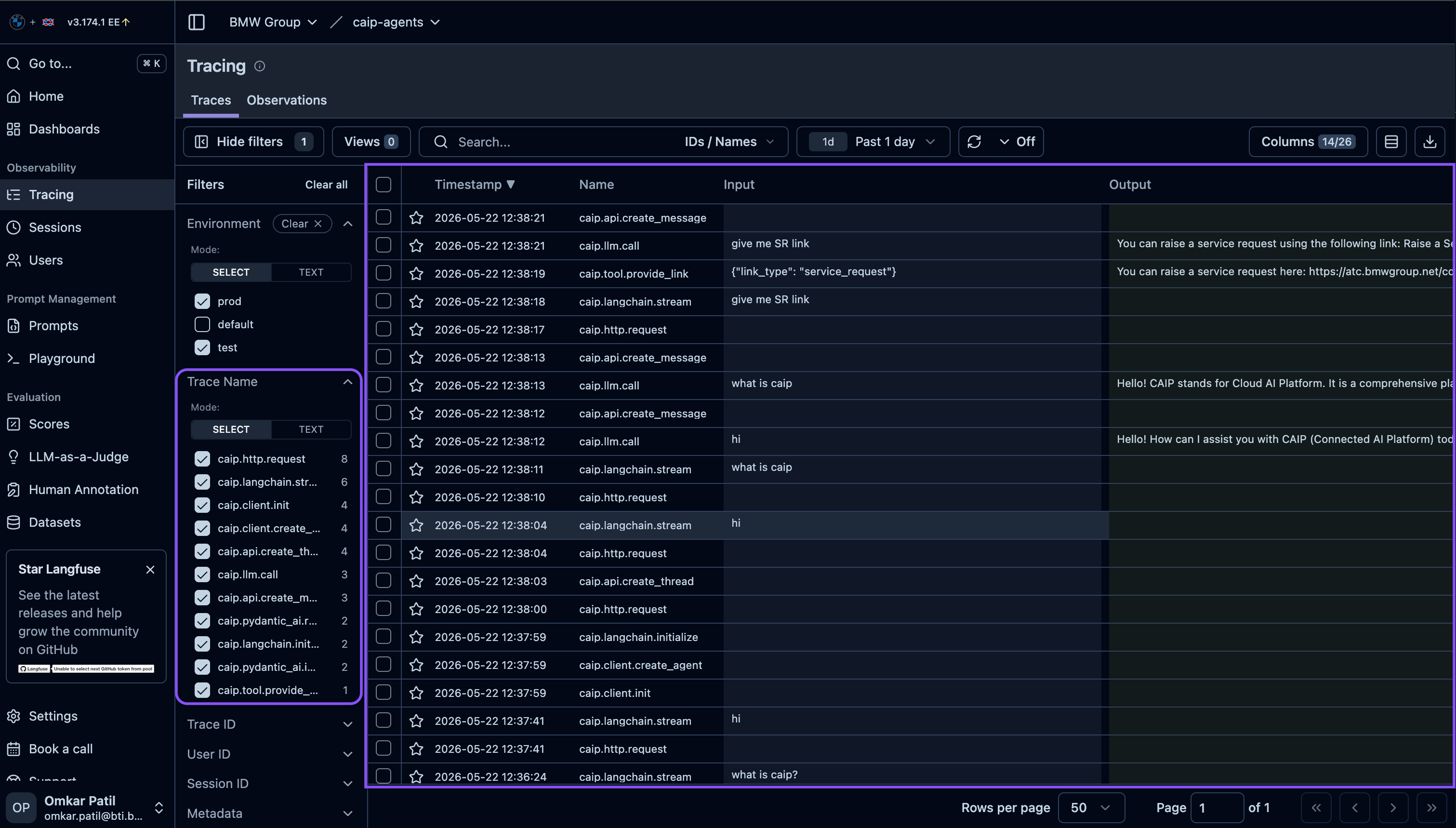
| Column | Description |
|---|---|
| Timestamp | When the trace started |
| Name | Root observation name (e.g., agent:handle_request) |
| Input | Preview of the trace input (user query) |
| Output | Preview of the trace output (response) |
| User | User ID if set via propagate_attributes |
| Session | Session ID for grouping conversations |
| Latency | Total execution time |
| Tokens | Input + output token count |
| Cost | Estimated cost based on model pricing |
| Tags | Custom labels for filtering |
Filtering Traces
Use filters to find specific traces:
| Filter | Example | Use Case |
|---|---|---|
| Name | rag:answer_question | Find specific operations |
| User ID | QX11111 | Debug a specific user's issues |
| Session ID | sess_abc123 | View complete conversation |
| Tags | production | Separate environments |
| Date Range | Last 24 hours | Recent activity |
| Latency | > 5000ms | Find slow requests |
| Cost | > $0.10 | Find expensive requests |
Single Trace View
Click any trace to see its complete execution tree:
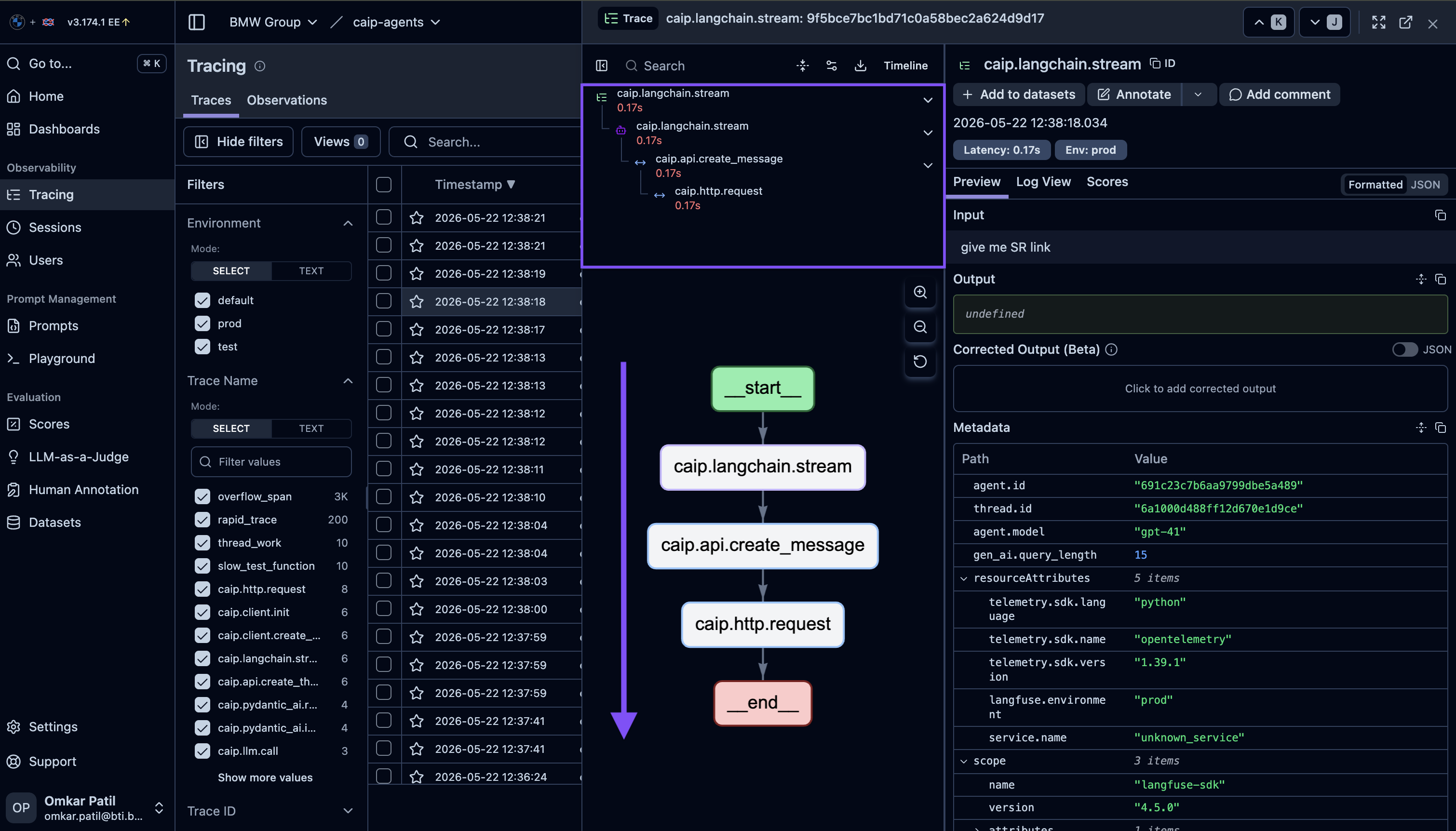
Trace tree shows:
- Hierarchy: Parent-child relationships between observations
- Timing: Duration bars showing relative execution time
- Types: Icons indicating observation type (span, generation, tool)
- Status: Success/error state for each observation
Click any observation in the tree to see:
- Input: Arguments passed to the function
- Output: Return value
- Metadata: Custom key-value pairs
- Timing: Start time, duration, end time
- For Generations: Model, tokens, cost
Generation Analysis
The Generation view focuses specifically on LLM calls.
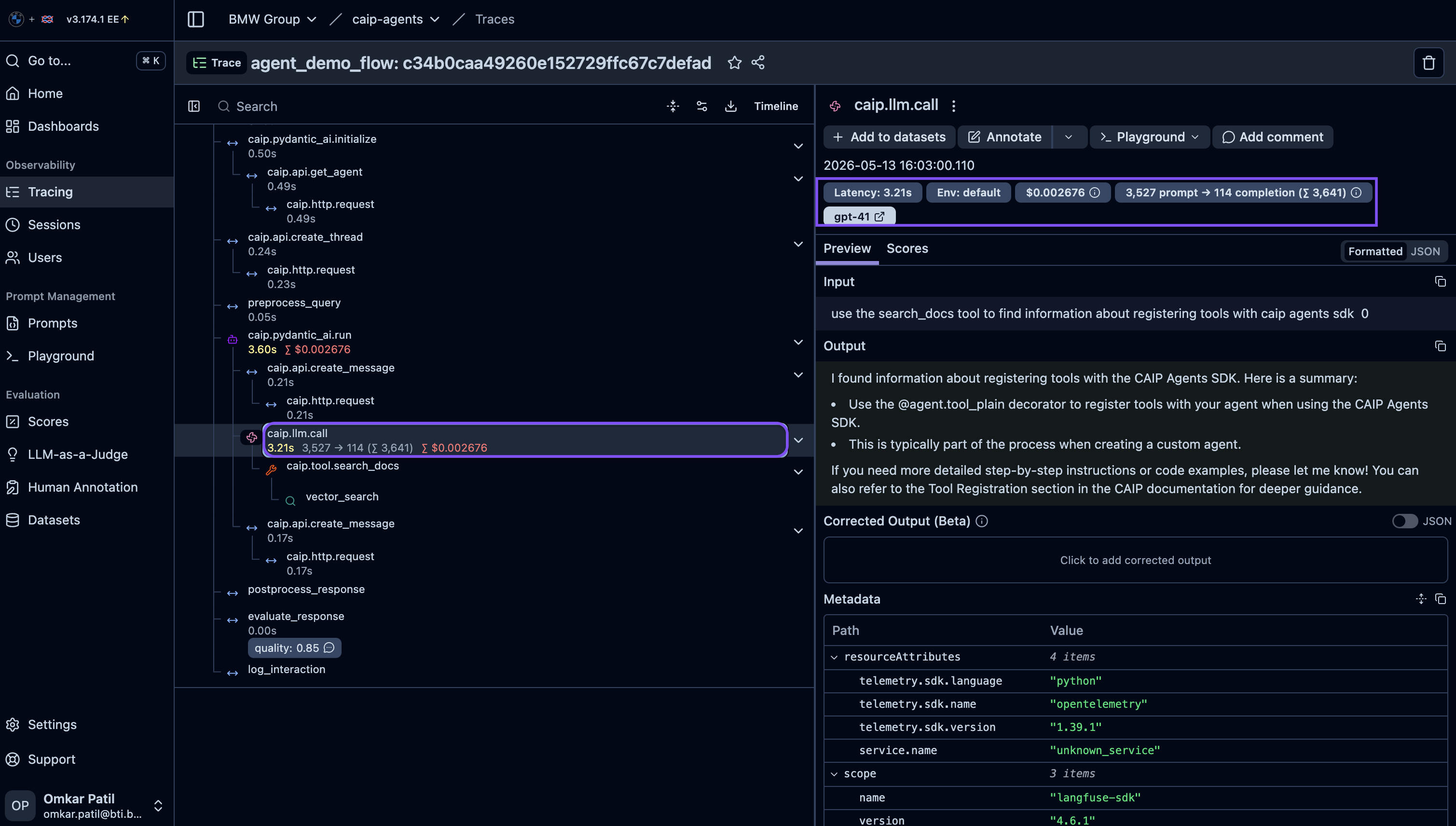
Generation Details
| Field | Description |
|---|---|
| Model | Model identifier (e.g., gpt-4o, claude-3-sonnet) |
| Input | Complete prompt sent to the model |
| Output | Full model response |
| Input Tokens | Tokens in the prompt |
| Output Tokens | Tokens in the completion |
| Total Tokens | Sum of input + output |
| Cost | Estimated cost (calculated from token counts) |
| Latency | Time to first token / total time |
Why This Matters
- Debug prompts: See exactly what was sent to the model
- Optimize costs: Identify expensive prompts
- Reduce latency: Find slow generations
- Compare models: Analyze performance across different models
Observation Types
The as_type parameter determines how Langfuse categorizes and displays observations:
| Type | Use Case | Icon |
|---|---|---|
span | General operations (default) | ○ |
generation | LLM/model calls | ⚡ |
retriever | Vector/document retrieval | 🔍 |
tool | Tool/function invocations | 🔧 |
agent | Agent orchestration | 🤖 |
chain | Multi-step pipelines | ⛓️ |
embedding | Embedding generation | 📊 |
guardrail | Safety/validation checks | 🛡️ |
Want to copy-paste and run these examples immediately? See the Complete Examples page for full working code with all imports and setup.
Observation Type Examples
Span (Default)
When to use: General-purpose operations, validation, formatting, any processing step.
from caip_agents_sdk.observability import observe

@observe(name="validate_input")
async def validate_input(text: str) -> bool:
    """Validate user input before processing."""
    if not text or len(text) > 10000:
        return False
    return True

@observe(name="format_response")
async def format_response(data: dict) -> str:
    """Format the final response for the user."""
    return json.dumps(data, indent=2)
Expected trace output:
Trace: handle_request
├── Span: validate_input (12ms)
└── Span: format_response (8ms)
Generation
When to use: LLM calls, model completions, text generation.
from caip_agents_sdk.observability import observe
import openai

@observe(name="llm:generate_response", as_type="generation")
async def generate_response(prompt: str) -> str:
    """Call GPT-4 to generate a response."""
    response = await openai.ChatCompletion.acreate(
        model="gpt-4o",
        messages=[{"role": "user", "content": prompt}]
    )
    return response.choices[0].message.content
Expected trace output:
Trace: answer_question
└── Generation: llm:generate_response (1,234ms)
    ├── Model: gpt-4o
    ├── Input Tokens: 456
    ├── Output Tokens: 128
    └── Cost: $0.0089
Retriever
When to use: Vector search, document retrieval, semantic search, RAG context fetching.
from caip_agents_sdk.observability import observe

@observe(name="rag:retrieve_documents", as_type="retriever")
async def retrieve_documents(query: str, k: int = 5) -> list:
    """Retrieve relevant documents from vector store."""
    embedding = await embed_query(query)
    results = await vector_store.search(embedding, top_k=k)
    return [
        {"content": r.content, "score": r.score}
        for r in results
    ]
Expected trace output:
Trace: rag_pipeline
├── Retriever: rag:retrieve_documents (234ms)
│   ├── Input: "How do I deploy an agent?"
│   └── Output: [5 documents retrieved]
└── Generation: llm:answer (890ms)
Tool
When to use: Function calls, tool invocations, external actions, API calls.
from caip_agents_sdk.observability import observe

@observe(name="tool:send_email", as_type="tool")
async def send_email(to: str, subject: str, body: str) -> dict:
    """Send an email using the email service."""
    result = await email_client.send(
        recipient=to,
        subject=subject,
        body=body
    )
    return {"status": "sent", "message_id": result.id}

@observe(name="tool:search_database", as_type="tool")
async def search_database(query: str) -> list:
    """Search the product database."""
    return await db.search(query)
Expected trace output:
Trace: agent_execute
├── Tool: tool:search_database (156ms)
│   ├── Input: {"query": "red shoes size 10"}
│   └── Output: [3 products found]
└── Tool: tool:send_email (89ms)
    ├── Input: {"to": "user@example.com", ...}
    └── Output: {"status": "sent"}
Agent
When to use: Agent orchestration, planning, task delegation.
from caip_agents_sdk.observability import observe

@observe(name="agent:plan_and_execute", as_type="agent")
async def plan_and_execute(goal: str) -> str:
    """Main agent that plans and executes tasks."""
    plan = await create_plan(goal)
    results = []

    for step in plan:
        result = await execute_step(step)
        results.append(result)

    return await summarize_results(results)

@observe(name="agent:create_plan")
async def create_plan(goal: str) -> list:
    """Create an execution plan for the goal."""
    return await planner.generate_plan(goal)
Expected trace output:
Trace: handle_request
└── Agent: agent:plan_and_execute (4,567ms)
    ├── Span: agent:create_plan (234ms)
    ├── Tool: tool:search (156ms)
    ├── Tool: tool:calculate (78ms)
    └── Generation: llm:summarize (890ms)
Chain
When to use: Multi-step pipelines, sequential processing, workflow orchestration.
from caip_agents_sdk.observability import observe

@observe(name="chain:process_document", as_type="chain")
async def process_document(document: str) -> dict:
    """Multi-step document processing pipeline."""
    # Step 1: Extract text
    text = await extract_text(document)

    # Step 2: Analyze sentiment
    sentiment = await analyze_sentiment(text)

    # Step 3: Extract entities
    entities = await extract_entities(text)

    # Step 4: Generate summary
    summary = await generate_summary(text)

    return {
        "sentiment": sentiment,
        "entities": entities,
        "summary": summary
    }
Expected trace output:
Trace: document_pipeline
└── Chain: chain:process_document (2,345ms)
    ├── Span: extract_text (45ms)
    ├── Generation: analyze_sentiment (456ms)
    ├── Generation: extract_entities (567ms)
    └── Generation: generate_summary (890ms)
Embedding
When to use: Text embedding generation, vector creation.
from caip_agents_sdk.observability import observe

@observe(name="embed:query", as_type="embedding")
async def embed_query(text: str) -> list:
    """Generate embedding for query text."""
    response = await openai.Embedding.acreate(
        model="text-embedding-3-small",
        input=text
    )
    return response.data[0].embedding

@observe(name="embed:documents", as_type="embedding")
async def embed_documents(documents: list) -> list:
    """Generate embeddings for multiple documents."""
    embeddings = []
    for doc in documents:
        emb = await embed_query(doc)
        embeddings.append(emb)
    return embeddings
Expected trace output:
Trace: rag_indexing
└── Embedding: embed:documents (567ms)
    ├── Embedding: embed:query (45ms)
    ├── Embedding: embed:query (43ms)
    └── Embedding: embed:query (44ms)
Guardrail
When to use: Input validation, safety checks, content filtering, compliance checks.
from caip_agents_sdk.observability import observe

@observe(name="guard:check_input", as_type="guardrail")
async def check_input_safety(text: str) -> dict:
    """Check if user input is safe to process."""
    result = await safety_checker.check(text)
    return {
        "safe": result.is_safe,
        "flags": result.flags,
        "action": "proceed" if result.is_safe else "block"
    }

@observe(name="guard:check_output", as_type="guardrail")
async def check_output_safety(response: str) -> dict:
    """Check if model output is safe to return."""
    result = await output_checker.check(response)
    if not result.is_safe:
        return await generate_safe_response()
    return response
Expected trace output:
Trace: safe_chat
├── Guardrail: guard:check_input (23ms)
│   └── Output: {"safe": true, "action": "proceed"}
├── Generation: llm:generate (890ms)
└── Guardrail: guard:check_output (34ms)
    └── Output: {"safe": true}
The @observe Decorator
Basic Usage
from caip_agents_sdk.observability import observe

@observe(name="my_function")
def sync_function(data: str) -> str:
    return process(data)

@observe(name="my_async_function")
async def async_function(query: str) -> str:
    return await some_async_call(query)
Parameters
| Parameter | Type | Description |
|---|---|---|
name | str | Display name in Langfuse UI (defaults to function name) |
as_type | str | Observation type (see table above) |
capture_input | bool | Whether to record function arguments (default: True) |
capture_output | bool | Whether to record return value (default: True) |
Automatic Nesting
Child observations are automatically linked to their parent:
@observe(name="main_process")
async def main_process(query: str) -> str:
    # Creates parent observation
    context = await fetch_context(query)  # Child 1
    response = await generate(query, context)  # Child 2
    return response

@observe(name="fetch_context", as_type="retriever")
async def fetch_context(query: str) -> dict:
    # Automatically nested under main_process
    return {"docs": [...]}

@observe(name="generate", as_type="generation")
async def generate(query: str, context: dict) -> str:
    # Automatically nested under main_process
    return "Generated response"
Resulting trace tree:
main_process
├── fetch_context
└── generate
User & Session Tracking
Using propagate_attributes
The propagate_attributes context manager attaches metadata to all nested observations:
from caip_agents_sdk.observability import observe, propagate_attributes

@observe(name="handle_request")
async def handle_request(user_id: str, session_id: str, message: str):
    with propagate_attributes(
        user_id=user_id,           # Appears in User column
        session_id=session_id,     # Groups related traces
        tags=["production", "v2"], # Filterable labels
        metadata={"team": "platform"}  # Custom key-value pairs
    ):
        return await process_message(message)
Viewing in Dashboard
User and session data appears in multiple places:
| Location | What You'll See |
|---|---|
| Trace list | User column for quick filtering |
| Sessions view | Grouped conversation threads |
| Users view | All traces by user |
See Users & Sessions for detailed user and session tracking documentation.
Complete Example: RAG Pipeline
Here's a complete example showing multiple observation types working together:
from caip_agents_sdk.observability import observe, propagate_attributes, flush
import asyncio

@observe(name="rag:answer_question")
async def answer_question(query: str, user_id: str) -> str:
    """Complete RAG pipeline with full tracing."""
    with propagate_attributes(user_id=user_id, tags=["rag", "production"]):
        # Step 1: Validate input
        if not await validate_query(query):
            return "Invalid query"

        # Step 2: Retrieve relevant documents
        docs = await retrieve_documents(query)

        # Step 3: Build context
        context = await build_context(docs)

        # Step 4: Generate answer
        answer = await generate_answer(query, context)

        # Step 5: Check safety
        safe_answer = await check_output(answer)

        return safe_answer

@observe(name="rag:validate", as_type="guardrail")
async def validate_query(query: str) -> bool:
    return len(query) > 0 and len(query) < 1000

@observe(name="rag:retrieve", as_type="retriever")
async def retrieve_documents(query: str) -> list:
    embedding = await embed_query(query)
    return await vector_store.search(embedding, k=5)

@observe(name="rag:embed", as_type="embedding")
async def embed_query(query: str) -> list:
    return await embedder.embed(query)

@observe(name="rag:build_context")
async def build_context(docs: list) -> str:
    return "\n".join([d["content"] for d in docs])

@observe(name="rag:generate", as_type="generation")
async def generate_answer(query: str, context: str) -> str:
    return await llm.complete(f"Context: {context}\n\nQuestion: {query}")

@observe(name="rag:safety_check", as_type="guardrail")
async def check_output(answer: str) -> str:
    if await safety_checker.is_safe(answer):
        return answer
    return "I cannot answer that question."

# Run the pipeline
async def main():
    answer = await answer_question(
        query="What is the deployment process?",
        user_id="user_123"
    )
    print(answer)
    flush()

asyncio.run(main())
Expected trace in Langfuse:
Trace: rag:answer_question (2,456ms)
├── Guardrail: rag:validate (8ms) ✓
├── Retriever: rag:retrieve (345ms)
│   └── Embedding: rag:embed (89ms)
├── Span: rag:build_context (12ms)
├── Generation: rag:generate (1,890ms)
│   ├── Model: gpt-4o
│   ├── Input Tokens: 1,234
│   ├── Output Tokens: 256
│   └── Cost: $0.0156
└── Guardrail: rag:safety_check (23ms) ✓
Adding Metadata
Static Metadata
Add fixed metadata at decoration time:
@observe(
    name="process_order",
    metadata={
        "service": "order-processor",
        "version": "2.1.0"
    }
)
async def process_order(order_id: str) -> dict:
    return {"status": "completed"}
Dynamic Metadata
Add metadata during execution based on runtime values:
from caip_agents_sdk.observability import observe, get_client

@observe(name="search_products")
async def search_products(query: str) -> list:
    results = await database.search(query)

    # Add metadata based on results
    client = get_client()
    if client:
        client.update_current_span(
            metadata={
                "result_count": len(results),
                "query_length": len(query),
                "has_results": len(results) > 0
            }
        )

    return results
Error Handling
from caip_agents_sdk.observability import observe, get_client

@observe(name="risky_operation")
async def risky_operation(data: dict) -> dict:
    try:
        result = await process(data)
        return result
    except Exception as e:
        # Record error in trace metadata
        client = get_client()
        if client:
            client.update_current_span(
                metadata={
                    "error": str(e),
                    "error_type": type(e).__name__
                }
            )
        raise  # Re-raise to mark trace as failed
Tips & Best Practices
Use prefixes to categorize operations:
agent:— Agent orchestrationtool:— Tool/function callsrag:— RAG pipeline stepsllm:— Direct LLM callsapi:— External API callsguard:— Guardrail checks
Call flush() before your application exits to ensure all traces are sent:
from caip_agents_sdk.observability import flush
flush()
Avoid including PII, API keys, or secrets in:
- Observation names
- Metadata values
- Captured inputs/outputs
Next Steps
- Users & Sessions — Track user activity and conversations
- Best Practices — Production-ready patterns
- Complete Examples — Ready-to-run code samples