LLM API Documentation
Overview
Welcome to the documentation for the Connected AI Platform (CAIP) Large Language Model (LLM) API. This API provides a unified interface to interact with various LLM model providers, including AWS Bedrock, Azure OpenAI, and Alibaba Cloud.
OpenAI-Compatible API
The CAIP LLM API is designed to be compliant with the official OpenAI API specification. In most cases, you can:
- reuse the same request/response structure you already use with OpenAI-compatible tooling,
- use the official OpenAI SDKs (Python/Node.js) by configuring
base_urlto the CAIP endpoint, - keep your application logic consistent across providers (Azure OpenAI, AWS Bedrock, Alibaba Cloud) by switching only the
model.
Supported Models
The LLM API supports state-of-the-art models in every region of the Connected AI Platform, including the latest versions of:
- GPT (OpenAI)
- Claude (Anthropic)
- Nova (Amazon)
- Llama (Meta)
- Qwen (Alibaba)
- DeepSeek (High-Flyer)
- Self-hosted open-source models (Qwen3, FLUX, Wan — running on CAIP infrastructure)
The exact list of available models is provided per endpoint. For the most common use case—chat completion—the list can be found here.
At present, our model portfolio is distributed across AWS, Azure, AliCloud, and self-hosted CAIP infrastructure. Self-hosted models run directly inside the CAIP cluster, never leave our VPC, and are available at zero additional cost. See the Self-Hosted Models documentation for details.
Data Usage & Restrictions
Internal BMW data may be processed through the CAIP LLM API.
Quickstart
Take your first steps with the CAIP LLM API.
Base URL
We provide production endpoints for both RoW and China:
RoW:
- PROD:
https://llm.api.caip.bmw.cloud
China:
- PROD:
https://llm.api.caip.bmwchina.cloud
Authentication
API keys can be obtained through the Self-Service Portal or by raising a Service Request of type 'Request API Key'.
Only UUID-format API keys (e.g. 123e4567-e89b-12d3-a456-426614174000) are accepted by the RoW LLM API. If your key does not match this format, please request a new one via the Self-Service Portal. For CN, existing API keys can continue to be used without requesting a new key.
The API key must be provided in the Authorization header of each request.
RoW (new stack) The RoW endpoint requires the industry-standard OAuth2 Bearer token format:
Authorization: Bearer <your_api_key>
China (new stack) The China endpoint requires the same industry-standard OAuth2 Bearer token format as RoW:
Authorization: Bearer <your_api_key>
The China region (https://llm.api.caip.bmwchina.cloud/) now runs on the new backend architecture. Authentication and endpoint interaction are aligned with RoW.
Model Fallbacks
The CAIP LLM API uses LiteLLM as its proxy layer, which provides automatic model fallbacks. When a request to your chosen model fails (due to rate limiting, provider outage, unsupported features, etc.), the API may automatically route the request to a fallback model to ensure you still receive a response.
How Fallbacks Work
- If a call to the requested model fails after retries, LiteLLM automatically tries the next model in the configured fallback chain.
- The response will return successfully (HTTP 200), but the
modelfield in the response will reflect the model that actually processed the request — not necessarily the one you specified. - Fallbacks are configured server-side by the CAIP team for all model groups.
model fieldAlways check the model field in the API response to confirm which model processed your request. If a fallback was triggered, the response model will differ from the one you requested.
Disabling Fallbacks
If you want strict model routing and prefer to receive an error rather than a silent fallback, you can disable fallbacks per request by adding disable_fallbacks: true to the request body.
Curl:
curl -X POST \
  'https://llm.api.caip.bmw.cloud/v1/chat/completions' \
  -H 'Authorization: Bearer {Your_apikey}' \
  -H 'Content-Type: application/json' \
  -d '{
  "model": "qwen3-chat",
  "messages": [{"role": "user", "content": "Hello"}],
  "disable_fallbacks": true
}'
OpenAI SDK (Python):
response = client.chat.completions.create(
    model="qwen3-chat",
    messages=[{"role": "user", "content": "Hello"}],
    extra_body={"disable_fallbacks": True}
)
Specifying Custom Fallbacks
You can also specify your own fallback chain per request using the fallbacks parameter. If the primary model fails, LiteLLM will try each fallback in order.
Curl:
curl -X POST \
  'https://llm.api.caip.bmw.cloud/v1/chat/completions' \
  -H 'Authorization: Bearer {Your_apikey}' \
  -H 'Content-Type: application/json' \
  -d '{
  "model": "qwen3-chat",
  "messages": [{"role": "user", "content": "Hello"}],
  "fallbacks": ["gpt-4o-mini", "gpt-4o"]
}'
OpenAI SDK (Python):
response = client.chat.completions.create(
    model="qwen3-chat",
    messages=[{"role": "user", "content": "Hello"}],
    extra_body={"fallbacks": ["gpt-4o-mini", "gpt-4o"]}
)
In this example, if qwen3-chat fails, the request will be tried against gpt-4o-mini first, then gpt-4o.
Fallback Types
The CAIP LLM API supports three types of fallbacks:
| Type | Trigger | Description |
|---|---|---|
| General fallbacks | Any error (429, 500, timeout, etc.) | Default fallback behavior for all error types |
| Context window fallbacks | Input exceeds model context limit | Automatically routes to a model with a larger context window |
| Content policy fallbacks | Content policy violation | Routes to a model with different content filtering |
Chat Completion Endpoint
Industry Standard Compatibility
Our API is fully compliant with the Official OpenAI Chat Completion Specification.
- OpenAI Compliant: The CAIP LLM API follows the OpenAI specification for request and response formats.
- Cross-Provider Consistency: Use the same request structure across Azure GPT, AWS Bedrock (Nova/Claude), and Alibaba Cloud models.
- SDK Ready: Works out-of-the-box with the official OpenAI Python/Node.js SDKs and Pydantic AI — no custom client needed.
- Standard Parameters: Core parameters like
temperature,tools,usage,metadata, andfinish_reasonare fully supported.
The max_tokens parameter is currently managed centrally and is overridden to 16384 for every request, regardless of the value you specify.
Model Selection
Model selection is specified via the model parameter. The recommended method is to include it directly within the JSON request body, which aligns with the OpenAI specification.
Passing the model via the model request header is no longer supported. The model must be specified using the model parameter within the JSON payload. This change aligns with the OpenAI specification and integrates smoothly with standard SDKs (OpenAI SDK, Langchain, etc.).
Model parameter accepts one of the following values: RoW:
AWS Bedrock:
claude-3-haiku(deprecated — forwards to Claude Haiku 4.5)claude-37-sonnet(deprecated — forwards to Claude Sonnet 4.6)claude-4-sonnet(deprecated — forwards to Claude Sonnet 4.6)claude-opus-4.5claude-opus-4.6claude-haiku-4.5claude-sonnet-4.6nova-litenova-micronova-prollama-32-1b(upcoming deprecation)llama-32-3b(upcoming deprecation)deepseek-v3.1qwen-plus(upcoming deprecation)qwen-flashqwen3-14b(upcoming deprecation)qwen3-30b-a3b-instruct-2507
Azure OpenAI:
gpt-4ogpt-4o-minigpt-41gpt-41-minigpt-41-nanogpt-5gpt-5-minigpt-5-nanogpt-5-2gpt-5.5o3deepseek-r1deepseek-v3
Self-Hosted (CAIP cluster):
qwen3-chat(Qwen3-4B — runs on-cluster, details)qwen3.6-35b-a3b(Qwen3.6-35B-A3B — supports tool calling and image input, vision guide)qwen3.6-35b-a3b-think(reasoning variant ofqwen3.6-35b-a3b)
The following models are deprecated or will be phased out soon:
- Legacy Claude (
claude-3-haiku,claude-37-sonnet,claude-4-sonnet): requests are internally forwarded to newer Claude models. Please migrate toclaude-haiku-4.5,claude-sonnet-4.6, orclaude-opus-4.6. - Llama 3.2 (
llama-32-1b,llama-32-3b): will be phased out in the near future. - CN models in RoW (
qwen-plus,qwen-flash,qwen3-14b): will soon be replaced with newer alternatives.
China:
Current CN chat models and capabilities:
| Model | Type | Input | Output |
|---|---|---|---|
qwen3.8-max | multimodal | text, image, video | text |
qwen3.7-plus | multimodal | text, image, video | text |
qwen3.7-max | text-only | text | text |
qwen3.7-flash | multimodal | text, image, video | text |
qwen3.6-plus | multimodal | text, image, video | text |
qwen3.6-flash | multimodal | text, image, video | text |
qwen3.6-27b | multimodal | text, image, video | text |
qwen3.5-plus | multimodal | text, image, video | text |
qwen3.5-flash | multimodal | text, image, video | text |
qwen3.5-27b | multimodal | text, image, video | text |
qwen3.5-omni-plus | multimodal | text, image, video, audio | text, audio |
qwen3.5-omni-plus-realtime | realtime (WebSocket) | text, image, video, audio | text, audio |
qwen3.5-omni-flash-realtime | realtime (WebSocket) | text, image, video, audio | text, audio |
qwen-plus | text-only | text | text |
qwen-flash | text-only | text | text |
qwen-max | text-only | text | text |
qwen-long | text-only | text | text |
gui-plus | multimodal | text, image | text |
tongyi-intent-detect-v3 | text-only | text | text |
qwen3-vl-plus | multimodal | text, image, video | text |
deepseek-v4-pro | text-only | text | text |
deepseek-v4-pro-0813 | text-only | text | text |
deepseek-v4-flash | text-only | text | text |
deepseek-v4-flash-0731 | text-only | text | text |
glm-5.2-fast-preview | text-only | text | text |
glm-5.2 | text-only | text | text |
glm-5 | text-only | text | text |
MiniMax-M3 | multimodal | text, image, video | text |
MiniMax-M2.5 | text-only | text | text |
kimi-k3 | text-only | text | text |
kimi-k2.7-code | multimodal | text, image, video | text |
kimi-k2.6 | multimodal | text, image, video | text |
kimi-k2.5 | multimodal | text, image, video | text |
This table lists CN chat models only. Current CN non-chat models are documented in their respective sections below:
- Embeddings:
qwen3.7-text-embedding,text-embedding-v4- Image generation:
qwen-image-3.0,qwen-image-3.0-pro,qwen-image-2.0,qwen-image-2.0-pro,qwen-image,qwen-image-plus,qwen-image-max,wan2.7-image,wan2.7-image-pro
Realtime WebSocket Endpoint
The realtime service provides bidirectional, low-latency text and audio conversations over WebSocket. It is available only in China and is compatible with the OpenAI Realtime event protocol. CAIP authenticates clients and relays events to the Alibaba Cloud Qwen Omni Realtime service; clients do not connect to DashScope directly.
wss://llm.api.caip.bmwchina.cloud/v1/realtime?model={model}
Specify one of the following models in the model query parameter:
| Model | Use case |
|---|---|
qwen3.5-omni-plus-realtime | Higher-quality bidirectional conversations |
qwen3.5-omni-flash-realtime | Lower-latency bidirectional conversations |
Authenticate the WebSocket handshake with the same CAIP API key used by the HTTP API:
Authorization: ******
The model query parameter selects the realtime deployment; it is not sent in session.update or response.create.
Event flow
- Open the WebSocket with the
Authorizationheader. - Send
session.update, then wait forsession.updatedbefore sending input. - For text, send
conversation.item.createand thenresponse.create. - For recorded audio with manual turn control, send one or more
input_audio_buffer.appendevents, theninput_audio_buffer.commitandresponse.create. - Read streaming delta events until
response.done. Anerrorevent indicates that the request could not be completed.
| Event or field | Purpose | Notes |
|---|---|---|
session.update | Configures the conversation session. | Wait for session.updated before adding an item or audio. |
session.modalities | Selects output modalities. | Use ["text", "audio"] to receive both text and speech. |
session.instructions | Sets persistent assistant behavior for the session. | Use it for language, persona, or response style. |
session.voice | Selects the model-supported output voice. | Tina is used in the examples. |
session.input_audio_format | Declares input encoding. | Set to pcm16. |
session.output_audio_format | Declares output encoding. | Set to pcm16; response.audio.delta is Base64-encoded PCM16. |
session.input_audio_transcription | Enables input speech transcription. | Set {"language": "zh"} for Chinese recognition. |
session.turn_detection | Controls server voice activity detection (VAD). | Use null for manually committed audio, or server_vad for microphone conversations. |
conversation.item.create | Adds a text message to the conversation. | Use an input_text content part. |
input_audio_buffer.append | Adds a Base64-encoded PCM16 audio chunk. | Send chunks continuously for microphone input. |
input_audio_buffer.commit | Marks manually buffered audio as a completed user turn. | Required when turn_detection is null. |
response.create | Requests a response for the current conversation. | Omit it when server VAD has create_response: true. |
input_audio_buffer.clear | Discards uncommitted captured audio. | Useful after a response to prevent echo or stale frames becoming the next turn. |
Useful server events include response.output_text.delta, response.audio.delta, response.audio_transcript.delta, conversation.item.input_audio_transcription.completed, response.done, and error. Event payloads are streamed as JSON text frames. If a binary WebSocket frame is received, preserve or handle it separately rather than attempting to JSON-decode it.
Text conversation example
Install the client dependency:
python -m pip install websockets
The following complete example configures a session, waits for confirmation, sends a text turn, and prints streamed text. It supports both current and older websockets header argument names.
import asyncio
import inspect
import json
import os

import websockets


async def send_event(websocket, event):
    await websocket.send(json.dumps(event, ensure_ascii=False))


async def wait_for_session_updated(websocket):
    while True:
        message = await websocket.recv()
        if isinstance(message, bytes):
            continue
        event = json.loads(message)
        if event["type"] == "error":
            raise RuntimeError(event)
        if event["type"] == "session.updated":
            return


async def main():
    url = (
        "wss://llm.api.caip.bmwchina.cloud/v1/realtime"
        "?model=qwen3.5-omni-plus-realtime"
    )
    headers = {"Authorization": f"Bearer {os.environ['CAIP_API_KEY']}"}
    header_argument = (
        "additional_headers"
        if "additional_headers" in inspect.signature(websockets.connect).parameters
        else "extra_headers"
    )

    async with websockets.connect(url, **{header_argument: headers}) as websocket:
        await send_event(websocket, {
            "type": "session.update",
            "session": {
                "modalities": ["text", "audio"],
                "input_audio_format": "pcm16",
                "output_audio_format": "pcm16",
                "voice": "Tina",
                "turn_detection": None,
                "input_audio_transcription": {"language": "zh"},
            },
        })
        await wait_for_session_updated(websocket)

        await send_event(websocket, {
            "type": "conversation.item.create",
            "item": {
                "type": "message",
                "role": "user",
                "content": [{"type": "input_text", "text": "Hello!"}],
            },
        })
        await send_event(websocket, {"type": "response.create"})

        async for message in websocket:
            if isinstance(message, bytes):
                continue
            event = json.loads(message)
            if event["type"] == "error":
                raise RuntimeError(event)
            if event["type"] in {
                "response.output_text.delta",
                "response.audio_transcript.delta",
            }:
                print(event["delta"], end="", flush=True)
            elif event["type"] == "response.done":
                print()
                break


asyncio.run(main())
Audio input and output
Audio sent in input_audio_buffer.append must be Base64-encoded, mono PCM16. The tested microphone configuration is 16 kHz, while generated audio is PCM16 at 24 kHz. Decode every response.audio.delta value from Base64 and write the resulting bytes to a 24 kHz mono PCM16 audio device or file.
The following standalone script sends a recorded WAV file and writes the returned speech to a raw PCM16 file. Save it as realtime_wav.py, set CAIP_API_KEY, and run python realtime_wav.py input.wav --output-audio response.pcm. The input must be mono, 16-bit PCM, and 24 kHz.
import argparse
import asyncio
import base64
import inspect
import json
import os
import wave

import websockets


DEFAULT_MODEL = "qwen3.5-omni-plus-realtime"
ENDPOINT = "wss://llm.api.caip.bmwchina.cloud/v1/realtime"


async def send_event(websocket, event):
    await websocket.send(json.dumps(event, ensure_ascii=False))


async def wait_for_session_updated(websocket):
    while True:
        message = await websocket.recv()
        if isinstance(message, bytes):
            continue
        event = json.loads(message)
        if event["type"] == "error":
            raise RuntimeError(event)
        if event["type"] == "session.updated":
            return


async def append_wav(websocket, path):
    with wave.open(path, "rb") as audio:
        if (
            audio.getnchannels() != 1
            or audio.getsampwidth() != 2
            or audio.getframerate() != 24000
        ):
            raise ValueError("WAV input must be mono, 16-bit PCM, 24000 Hz")

        while chunk := audio.readframes(2400):
            await send_event(websocket, {
                "type": "input_audio_buffer.append",
                "audio": base64.b64encode(chunk).decode("ascii"),
            })


async def main(args):
    api_key = os.environ["CAIP_API_KEY"]
    url = f"{ENDPOINT}?model={args.model}"
    headers = {"Authorization": f"Bearer {api_key}"}
    header_argument = (
        "additional_headers"
        if "additional_headers" in inspect.signature(websockets.connect).parameters
        else "extra_headers"
    )

    async with websockets.connect(url, **{header_argument: headers}) as websocket:
        await send_event(websocket, {
            "type": "session.update",
            "session": {
                "modalities": ["text", "audio"],
                "input_audio_format": "pcm16",
                "output_audio_format": "pcm16",
                "voice": "Tina",
                "turn_detection": None,
                "input_audio_transcription": {"language": "zh"},
            },
        })
        await wait_for_session_updated(websocket)

        await append_wav(websocket, args.audio)
        await send_event(websocket, {"type": "input_audio_buffer.commit"})
        await send_event(websocket, {"type": "response.create"})

        with open(args.output_audio, "wb") as output_audio:
            while True:
                message = await websocket.recv()
                if isinstance(message, bytes):
                    continue
                event = json.loads(message)
                if event["type"] == "error":
                    raise RuntimeError(event)
                if event["type"] in {
                    "response.output_text.delta",
                    "response.audio_transcript.delta",
                }:
                    print(event["delta"], end="", flush=True)
                elif event["type"] == "response.audio.delta":
                    output_audio.write(base64.b64decode(event["delta"]))
                elif event["type"] == "response.done":
                    print()
                    return


parser = argparse.ArgumentParser()
parser.add_argument("audio", help="mono 16-bit PCM WAV at 24000 Hz")
parser.add_argument("--model", default=DEFAULT_MODEL)
parser.add_argument("--output-audio", default="response.pcm")
asyncio.run(main(parser.parse_args()))
response.pcm is raw mono PCM16 at 24 kHz, not a WAV container. Play or convert it with a tool that accepts those format settings.
For continuous microphone conversations, enable server VAD instead of manually committing every utterance. The following standalone client records at 16 kHz, plays generated speech at 24 kHz, and prevents speaker audio from becoming the next user turn. Install its dependencies with python -m pip install websockets pyaudio, set CAIP_API_KEY, then run python realtime_microphone.py.
import asyncio
import base64
import inspect
import json
import os
import time

import pyaudio
import websockets


ENDPOINT = "wss://llm.api.caip.bmwchina.cloud/v1/realtime"
MODEL = "qwen3.5-omni-plus-realtime"
INPUT_RATE = 16_000
OUTPUT_RATE = 24_000
CHUNK_FRAMES = 3_200
ECHO_COOLDOWN_SECONDS = 1.2


async def send_event(websocket, event):
    await websocket.send(json.dumps(event, ensure_ascii=False))


async def capture_microphone(websocket, microphone, assistant_speaking, cooldown):
    while True:
        audio = await asyncio.to_thread(
            microphone.read, CHUNK_FRAMES, exception_on_overflow=False
        )
        if assistant_speaking.is_set() or time.monotonic() < cooldown[0]:
            continue
        await send_event(websocket, {
            "type": "input_audio_buffer.append",
            "audio": base64.b64encode(audio).decode("ascii"),
        })


async def play_responses(websocket, speaker, assistant_speaking, cooldown):
    while True:
        message = await websocket.recv()
        if isinstance(message, bytes):
            speaker.write(message)
            continue

        event = json.loads(message)
        event_type = event["type"]
        if event_type in {"response.created", "response.output_item.added"}:
            assistant_speaking.set()
        elif event_type == "response.audio.delta":
            assistant_speaking.set()
            speaker.write(base64.b64decode(event["delta"]))
        elif event_type == "conversation.item.input_audio_transcription.completed":
            print(f"\r[User] {event['transcript']}", flush=True)
        elif event_type == "response.audio_transcript.delta":
            print(event["delta"], end="", flush=True)
        elif event_type == "response.audio_transcript.done":
            print()
        elif event_type == "response.done":
            assistant_speaking.clear()
            cooldown[0] = time.monotonic() + ECHO_COOLDOWN_SECONDS
            await send_event(websocket, {"type": "input_audio_buffer.clear"})
        elif event_type == "error":
            raise RuntimeError(event)


async def main():
    api_key = os.environ["CAIP_API_KEY"]
    headers = {"Authorization": f"Bearer {api_key}"}
    header_argument = (
        "additional_headers"
        if "additional_headers" in inspect.signature(websockets.connect).parameters
        else "extra_headers"
    )
    url = f"{ENDPOINT}?model={MODEL}"
    audio = pyaudio.PyAudio()
    microphone = audio.open(
        format=pyaudio.paInt16,
        channels=1,
        rate=INPUT_RATE,
        input=True,
        frames_per_buffer=CHUNK_FRAMES,
    )
    speaker = audio.open(
        format=pyaudio.paInt16,
        channels=1,
        rate=OUTPUT_RATE,
        output=True,
    )
    assistant_speaking = asyncio.Event()
    cooldown = [0.0]

    try:
        async with websockets.connect(url, **{header_argument: headers}) as websocket:
            await send_event(websocket, {
                "type": "session.update",
                "session": {
                    "modalities": ["text", "audio"],
                    "voice": "Tina",
                    "input_audio_format": "pcm16",
                    "output_audio_format": "pcm16",
                    "input_audio_transcription": {"language": "zh"},
                    "instructions": "你是个人助理小云,请用幽默风趣的方式回答用户的问题。",
                    "turn_detection": {
                        "type": "server_vad",
                        "threshold": 0.5,
                        "prefix_padding_ms": 300,
                        "silence_duration_ms": 800,
                        "create_response": True,
                        "interrupt_response": False,
                    },
                },
            })
            print("对话已开始,对着麦克风说话 (Ctrl+C 退出)...")
            await asyncio.gather(
                capture_microphone(
                    websocket, microphone, assistant_speaking, cooldown
                ),
                play_responses(websocket, speaker, assistant_speaking, cooldown),
            )
    finally:
        microphone.close()
        speaker.close()
        audio.terminate()


asyncio.run(main())
The service detects the end of speech and creates the response automatically because create_response is true; do not also send input_audio_buffer.commit or response.create for that turn.
CN Multimodal Example Requests
The CN deployment supports multimodal chat examples for image, video, and audio input, and also audio output for compatible models.
Text + Image -> Text (qwen3.7-plus)
{
  "model": "qwen3.7-plus",
  "messages": [
    {
      "role": "system",
      "content": [
        {
          "type": "text",
          "text": "You are a helpful multimodal assistant."
        }
      ]
    },
    {
      "role": "user",
      "content": [
        {
          "type": "text",
          "text": "Describe what you see in this image."
        },
        {
          "type": "image_url",
          "image_url": {
            "url": "https://help-static-aliyun-doc.aliyuncs.com/file-manage-files/zh-CN/20241022/emyrja/dog_and_girl.jpeg"
          }
        }
      ]
    }
  ],
  "stream": true,
  "stream_options": {"include_usage": true},
  "enable_thinking": false,
  "enable_search": false
}
Text + Video -> Text (qwen3.7-plus)
{
  "model": "qwen3.7-plus",
  "messages": [
    {
      "role": "user",
      "content": [
        {
          "type": "text",
          "text": "Describe the key events in this video."
        },
        {
          "type": "video_url",
          "video_url": {
            "url": "https://help-static-aliyun-doc.aliyuncs.com/file-manage-files/zh-CN/20241115/cqqkru/1.mp4"
          }
        }
      ]
    }
  ],
  "stream": true,
  "stream_options": {"include_usage": true},
  "enable_thinking": false,
  "enable_search": false
}
Text + Audio -> Text (qwen3.5-omni-plus)
{
  "model": "qwen3.5-omni-plus",
  "messages": [
    {
      "role": "user",
      "content": [
        {
          "type": "text",
          "text": "Please summarize this audio in one sentence."
        },
        {
          "type": "input_audio",
          "input_audio": {
            "format": "wav",
            "data": "https://help-static-aliyun-doc.aliyuncs.com/file-manage-files/zh-CN/20250211/tixcef/cherry.wav"
          }
        }
      ]
    }
  ],
  "stream": true,
  "stream_options": {"include_usage": true},
  "enable_thinking": false,
  "enable_search": false
}
Audio output (Base64) decoding script - Method 1 (recommended)
The audio output of qwen3.5-omni-plus is streamed in Base64 chunks. You can collect all chunks and decode once after streaming completes.
import base64
import numpy as np
import soundfile as sf
from openai import OpenAI

client = OpenAI(
  base_url="https://llm.api.caip.bmwchina.cloud/v1",
  api_key="${APIKey}",
)

completion = client.chat.completions.create(
  model="qwen3.5-omni-plus",
  messages=[{"role": "user", "content": "Who are you?"}],
  modalities=["text", "audio"],
  audio={"voice": "Tina", "format": "wav"},
  stream=True,
  stream_options={"include_usage": True},
)

audio_base64_string = ""
for chunk in completion:
  if chunk.choices and chunk.choices[0].delta.content:
    print(chunk.choices[0].delta.content, end="")

  if chunk.choices and hasattr(chunk.choices[0].delta, "audio") and chunk.choices[0].delta.audio:
    audio_base64_string += chunk.choices[0].delta.audio.get("data", "")

if audio_base64_string:
  wav_bytes = base64.b64decode(audio_base64_string)
  audio_np = np.frombuffer(wav_bytes, dtype=np.int16)
  sf.write("audio_assistant.wav", audio_np, samplerate=24000)
  print("\nSaved: audio_assistant.wav")
Local audio file as Base64 input (input_audio)
import base64
from openai import OpenAI

def encode_audio(audio_path: str) -> str:
  with open(audio_path, "rb") as f:
    return base64.b64encode(f.read()).decode("utf-8")

client = OpenAI(
  base_url="https://llm.api.caip.bmwchina.cloud/v1",
  api_key="${APIKey}",
)

audio_base64 = encode_audio("sample.wav")

completion = client.chat.completions.create(
  model="qwen3.5-omni-plus",
  messages=[
    {
      "role": "user",
      "content": [
        {
          "type": "input_audio",
          "input_audio": {
            "data": audio_base64,
            "format": "wav"
          }
        },
        {
          "type": "text",
          "text": "Please summarize this audio in one sentence."
        }
      ]
    }
  ],
  stream=True,
  stream_options={"include_usage": True},
)

for chunk in completion:
  if chunk.choices and chunk.choices[0].delta.content:
    print(chunk.choices[0].delta.content, end="")
Text -> Audio (qwen3.5-omni-plus)
{
  "model": "qwen3.5-omni-plus",
  "messages": [
    {
      "role": "user",
      "content": [
        {
          "type": "text",
          "text": "Answer in one short sentence, then speak it aloud."
        }
      ]
    }
  ],
  "stream": true,
  "stream_options": {"include_usage": true},
  "modalities": ["text", "audio"],
  "audio": {
    "voice": "Tina",
    "format": "mp3"
  },
  "enable_thinking": false,
  "enable_search": false
}
Tool Calling (Function Calling)
Tool calling transforms the LLM from a chatbot into an action-oriented agent. Instead of just generating text, the model can "request" to use your own functions to fetch real-time data or perform actions.
How it works: You provide a list of "tools" (function definitions, custom or external) in your request. The model returns a structured JSON object with the arguments needed to run that function.
Example
curl -X 'POST' 'https://llm.api.caip.bmw.cloud/v1/chat/completions' \
-H 'Authorization: Bearer {Your_apikey}' \
-H 'Content-Type: application/json' \
-d '{
  "model": "claude-37-sonnet",
  "messages": [{"role": "user", "content": "What is the status of order #999?"}],
  "tools": [
    {
      "type": "function",
      "function": {
        "name": "get_order_status",
        "description": "Retrieves the shipping status for a specific order ID",
        "parameters": {
          "type": "object",
          "properties": {
            "order_id": {"type": "string", "description": "The customer order ID"}
          },
          "required": ["order_id"]
        }
      }
    }
  ]
}'
Response
{
	"id": "chatcmpl-f53a712b-5d5f-4159-a753-8168c09100f0",
	"created": 1771243359,
	"model": "eu.anthropic.claude-3-7-sonnet-20250219-v1:0",
	"object": "chat.completion",
	"usage": {
		"prompt_tokens": 392,
		"completion_tokens": 101,
		"total_tokens": 493
	},
	"choices": [
		{
			"index": 0,
			"finish_reason": "tool_calls",
			"message": {
				"tool_calls": [
					{
						"id": "tooluse_1CRWGq2bGTDiDJ3kChh0cX",
						"type": "function",
						"function": {
							"arguments": "{\"order_id\":\"999\"}",
							"name": "get_order_status"
						}
					}
				],
				"role": "assistant",
				"content": "Certainly! I'd be happy to help you check the status of order #999. To retrieve this information, I'll need to use the order status lookup tool. Let me do that for you right away."
			}
		}
	]
}
Curl Example
Recommended (OpenAI Compatible Format) This example uses the Bearer token for authorization and specifies the model within the request body.
Request
curl -X 'POST' \
  'https://llm.api.caip.bmw.cloud/v1/chat/completions' \
  -H 'accept: application/json' \
  -H 'Authorization: Bearer {Your_apikey}' \
  -H 'Content-Type: application/json' \
  -d '{
  "model": "gpt-4o",
  "messages": [
    {
      "role": "system",
      "content": "You are a mathematician"
    },
    {
      "role": "user",
      "content": "What is 1+1?"
    }
  ]
}'
Response
{
	"choices": [
		{
			"finish_reason": "stop",
			"index": 0,
			"logprobs": null,
			"message": {
				"annotations": [],
				"content": "1 + 1 equals 2.",
				"refusal": null,
				"role": "assistant"
			}
		}
	],
	"created": 1771251813,
	"id": "chatcmpl-D9tnZ4tdNPnfw6IWb6paAAWKFpH1j",
	"model": "gpt-4o-2024-08-06",
	"object": "chat.completion",
	"system_fingerprint": "fp_e9b9b028d7",
	"usage": {
		"completion_tokens": 9,
		"completion_tokens_details": {
			"accepted_prediction_tokens": 0,
			"audio_tokens": 0,
			"reasoning_tokens": 0,
			"rejected_prediction_tokens": 0
		},
		"prompt_tokens": 23,
		"prompt_tokens_details": {
			"audio_tokens": 0,
			"cached_tokens": 0
		},
		"total_tokens": 32
	}
}
Understanding the Response
-
Usage Metadata (Token Tracking) Every response includes a usage object. This is essential for monitoring consumption and costs. It includes:
- prompt_tokens: Tokens used in your input and tool definitions.
- completion_tokens: Tokens generated by the model.
- total_tokens: The sum of prompt and completion tokens.
-
Finish Reasons The finish_reason field indicates why the model stopped generating:
- stop: The model finished the natural response.
- tool_calls: The model is requesting a function execution (the content field will be null in this case).
- length: The model hit the max_tokens limit.
💡 Note for China users
Usehttps://llm.api.caip.bmwchina.cloud/v1for CN region
Pydantic AI Example
Using Pydantic AI currently only works out-of-the-box with OpenAI models e.g. gpt-4o. The CAIP team is working on enabling the rest of the model selection. The Pydantic AI library can now be used in a much more standard way with our fully OpenAI-compatible API.
Recommended (Standard Integration) Configure the OpenAIProvider by passing your API key (with the Bearer prefix) directly. You can then specify the model name when creating the OpenAIModel.
from pydantic_ai import Agent
from pydantic_ai.providers.openai import OpenAIProvider
from pydantic_ai.models.openai import OpenAIChatModel
from openai import AsyncOpenAI

client = AsyncOpenAI(
    base_url="https://llm.api.caip.bmw.cloud/v1", # https://llm.api.caip.bmwchina.cloud/v1 for CN
    api_key="{Your_apikey}"
)

model = OpenAIChatModel("gpt-4o", provider=OpenAIProvider(openai_client=client))
agent = Agent(model)
OpenAI SDK Support
The LLMAPI is fully compatible with the OpenAI Python SDK. Because our API now adheres to the OpenAI specification, you can use the SDK in a standard and intuitive way.
Client Configuration — RoW (new stack)
from openai import OpenAI

client = OpenAI(
  base_url="https://llm.api.caip.bmw.cloud/v1",
  api_key="{Your_apikey}",
)
Client Configuration — China (new stack)
The China endpoint uses the same standard OpenAI SDK configuration as RoW:
from openai import OpenAI

client = OpenAI(
  base_url="https://llm.api.caip.bmwchina.cloud/v1",
  api_key="{Your_apikey}",
)
Chat Completion (Recommended)
completion = client.chat.completions.create(
  model="gpt-4o", # Simply specify the model here
  messages=[
    {
      "role": "user",
      "content": "Write a one-sentence bedtime story about a unicorn."
    }
  ],
)
print(completion.choices[0].message.content)
Streaming Example
Additionally, the optional streaming parameter can be set to ensure fast model responses e.g. for building a ChatBot:
stream = client.chat.completions.create(
  model="gpt-4o", # Specify the model directly
  messages=[
    {
      "role": "system",
      "content": "You are a mathematician"
    },
    {
      "role": "user",
      "content": "What is 1+1?"
    }
  ],
  stream=True
)

for chunk in stream:
  print(chunk.choices[0].delta.content or "", end="", flush=True)
CN Request Parameters (Provider-specific)
For China models, the following optional parameters are commonly used:
enable_thinking(boolean): toggles provider reasoning mode for supported models.enable_search(boolean): toggles provider search augmentation for supported models.modalities(array): use["text", "audio"]when requesting audio output fromqwen3.5-omni-plus.audio(object): audio output settings such asvoiceandformatwhenmodalitiesincludesaudio.
Note: These are provider-specific extensions and not part of the core OpenAI spec. With the OpenAI SDK, pass them via
extra_body.
Responses Endpoint
OpenAI’s most advanced interface for generating model responses. Supports text and image inputs, and text outputs. Create stateful interactions with the model, using the output of previous responses as input. Extend the model’s capabilities with built-in tools for file search, web search, computer use, and more. Allow the model access to external systems and data using function calling.
Model Selection
Model selection is specified via the model parameter in the request body.
Model parameter accepts one of the following values:
RoW:
Azure OpenAI:
gpt-5-codexgpt-5-proo3-pro
China:
Not supported yet.
Configuration
- input (Text, image, or file inputs to the model, used to generate a response.)
- reasoning.effort (optional) Reasoning effort level. Allowed values:
none,minimal,low,medium,high. Default:medium.
Curl Example
Text input example
curl -X 'POST' \
  'https://llm.api.caip.bmw.cloud/v1/responses' \
  -H 'accept: application/json' \
  -H 'Authorization: Bearer {Your_apikey}' \
  -H 'Content-Type: application/json' \
  -d '{
  "model": "gpt-5-codex",
  "input": [
    {
      "role": "system",
      "content": "You are a mathematician"
    },
    {
      "role": "user",
      "content": "What is 1+1?"
    }
  ]
}'
Output
{
  "id": "resp_0ef5749f1972327200698adc3368a8819780019a9d42c3a5d2",
  "object": "response",
  "created_at": 1770708019,
  "status": "completed",
  "background": false,
  "completed_at": 1770708021,
  "content_filters": [
    {
      "blocked": false,
      "source_type": "prompt",
      "content_filter_raw": null,
      "content_filter_results": {
        "jailbreak": {
          "filtered": false,
          "detected": false
        },
        "self_harm": {
          "filtered": false,
          "severity": "safe"
        },
        "sexual": {
          "filtered": false,
          "severity": "safe"
        },
        "hate": {
          "filtered": false,
          "severity": "safe"
        },
        "violence": {
          "filtered": false,
          "severity": "safe"
        }
      },
      "content_filter_offsets": {
        "start_offset": 260,
        "end_offset": 272,
        "check_offset": 0
      }
    },
    {
      "blocked": false,
      "source_type": "completion",
      "content_filter_raw": null,
      "content_filter_results": {
        "self_harm": {
          "filtered": false,
          "severity": "safe"
        },
        "violence": {
          "filtered": false,
          "severity": "safe"
        },
        "sexual": {
          "filtered": false,
          "severity": "safe"
        },
        "hate": {
          "filtered": false,
          "severity": "safe"
        },
        "protected_material_text": {
          "filtered": false,
          "detected": false
        },
        "protected_material_code": {
          "filtered": false,
          "detected": false
        }
      },
      "content_filter_offsets": {
        "start_offset": 0,
        "end_offset": 26,
        "check_offset": 0
      }
    }
  ],
  "error": null,
  "incomplete_details": null,
  "instructions": null,
  "max_output_tokens": null,
  "max_tool_calls": null,
  "model": "gpt-5-codex",
  "output": [
    {
      "id": "rs_0ef5749f1972327200698adc342d2c8197bab3c5ad17d7cb06",
      "type": "reasoning",
      "summary": []
    },
    {
      "id": "msg_0ef5749f1972327200698adc34524481978c136a0c4c758348",
      "type": "message",
      "status": "completed",
      "content": [
        {
          "type": "output_text",
          "annotations": [],
          "logprobs": [],
          "text": "1 + 1 = 2"
        }
      ],
      "role": "assistant"
    }
  ],
  "parallel_tool_calls": true,
  "previous_response_id": null,
  "prompt_cache_key": null,
  "prompt_cache_retention": null,
  "reasoning": {
    "effort": "medium",
    "summary": null
  },
  "safety_identifier": null,
  "service_tier": "default",
  "store": true,
  "temperature": 1.0,
  "text": {
    "format": {
      "type": "text"
    },
    "verbosity": "medium"
  },
  "tool_choice": "auto",
  "tools": [],
  "top_logprobs": 0,
  "top_p": 1.0,
  "truncation": "disabled",
  "usage": {
    "input_tokens": 22,
    "input_tokens_details": {
      "cached_tokens": 0
    },
    "output_tokens": 13,
    "output_tokens_details": {
      "reasoning_tokens": 0
    },
    "total_tokens": 35
  },
  "user": null,
  "metadata": {}
}
OpenAI SDK Support
python format
from openai import OpenAI

client = OpenAI(
    base_url="https://llm.api.caip.bmw.cloud/v1",
    api_key="${APIKey}"
)

response = client.responses.create(
  model="gpt-5-codex",
  input=[
    {
      "role": "system",
      "content": "You are a mathematician"
    },
    {
      "role": "user",
      "content": "What is 1+1?"
    }
  ]
)

print(response)
Embeddings Endpoint
In addition to the chat completion functionality, the LLMAPI also provides an Embeddings endpoint which is essential for constructing RAG based use cases e.g. custom chatbots.
(Release planned for 12.08.2025)
Model Selection
The available models are specified via the model parameter in the payload, which accepts one of the following values:
RoW:
Azure OpenAI:
text-embedding-3-smalltext-embedding-3-large
AWS Bedrock:
titan-text-embeddings-v2
Self-Hosted (CAIP cluster):
qwen3-embedding(Qwen3-Embedding-0.6B — runs on-cluster, details)
China:
Ali Cloud:
qwen3.7-text-embeddingtext-embedding-v4
Configuration
There are 3 input parameters for using the Embeddings API:
- input (text that should be embedded)
- encoding_format (data type of the embedding vector)
- dimension (the desired length of the embedding vector)
The default embedding dimension is 1024. Supported values include 2048, 1536, 1024, 768, 512, 256, 128, and 64.
Curl Example
Recommended (OpenAI Compatible Format)
This is the standard and recommended way to call the embeddings endpoint. It uses the Bearer token for authorization and specifies the model directly within the JSON request body.
curl -X 'POST' \
  'https://llm.api.caip.bmw.cloud/v1/embeddings' \  # or https://llm.api.caip.bmwchina.cloud/v1/embeddings for CN
  -H 'accept: application/json' \
  -H 'Authorization: Bearer <api-key>' \
  -H 'Content-Type: application/json' \
  -d '{
  "model": "text-embedding-3-small",
  "input": "Introduction to embedding models",
  "dimensions": 1024,
  "encoding_format": "float"
}'
Output
{
  "object": "list",
  "data": [
    {
      "object": "embedding",
      "index": 0,
      "embedding": [
        0.012260042,
        -0.006679122,
        0.03958664,
        ...
        -0.014578468,
        -0.013396777,
        -0.00040881525
      ]
    }
  ],
  "model": "text-embedding-3-small",
  "usage": {
    "prompt_tokens": 4,
    "total_tokens": 4
  }
}
OpenAI SDK Support
The LLMAPI is fully compatible with the OpenAI Python SDK which has been adopted by the vast majority of the GenAI industry.
Client Configuration — RoW (new stack)
from openai import OpenAI

client = OpenAI(
  base_url="https://llm.api.caip.bmw.cloud/v1",
  api_key="{Your_apikey}",
)
Client Configuration — China (new stack)
from openai import OpenAI

client = OpenAI(
  base_url="https://llm.api.caip.bmwchina.cloud/v1",
  api_key="{Your_apikey}",
)
Creating Embeddings (Recommended) Pass the model name directly into the model parameter of the embeddings.create method.
# Create embeddings
response = client.embeddings.create(
    model="text-embedding-3-small", # Simply specify the model here
    input="Introduction to embedding models",
    dimensions=1024,
    encoding_format="float"
)

# Access the embedding data
embeddings = response.data[0].embedding
print(f"Embedding dimension: {len(embeddings)}")
Rerank Endpoint
The Rerank endpoint scores and re-orders a list of documents by semantic relevance to a query. This is a key building block for Retrieval-Augmented Generation (RAG) pipelines — use it after an initial vector or keyword search to surface the most relevant results before passing them to an LLM.
Model Selection
The available models are specified via the model parameter in the request body.
RoW:
AWS Bedrock:
cohere-rerank-v3-5
China:
Not supported yet.
Configuration
The following parameters are supported:
model(required) — model name (see above).query(required) — the search query to rank documents against.documents(required) — list of documents to rerank. Each item can be a plain string or an object.top_n(optional) — number of top results to return. Defaults to all documents.return_documents(optional, defaultfalse) — whentrue, the original document text is included in the response alongside the score.rank_fields(optional) — when documents are objects, specifies which fields to use for ranking.
Curl Example
curl -X 'POST' \
  'https://llm.api.caip.bmw.cloud/v1/rerank' \
  -H 'accept: application/json' \
  -H 'Authorization: Bearer {Your_apikey}' \
  -H 'Content-Type: application/json' \
  -d '{
  "model": "cohere-rerank-v3-5",
  "query": "What is the best electric car?",
  "documents": [
    "BMW iX M60 is a high-performance electric SUV.",
    "The Tesla Model S has a long range.",
    "Gasoline cars are common worldwide."
  ],
  "top_n": 3,
  "return_documents": true
}'
Output
{
  "id": "rerank-abc123",
  "results": [
    {
      "index": 0,
      "relevance_score": 0.9821,
      "document": {
        "text": "BMW iX M60 is a high-performance electric SUV."
      }
    },
    {
      "index": 1,
      "relevance_score": 0.8754,
      "document": {
        "text": "The Tesla Model S has a long range."
      }
    },
    {
      "index": 2,
      "relevance_score": 0.1032,
      "document": {
        "text": "Gasoline cars are common worldwide."
      }
    }
  ],
  "meta": null
}
Each result contains:
index— the original position of the document in the input list.relevance_score— a score between 0 and 1 indicating semantic relevance to the query (higher is more relevant).document— the original document content (only present whenreturn_documents: true).
Python Example
The rerank endpoint does not follow the OpenAI spec, so the standard OpenAI SDK does not provide a dedicated rerank client. Use the Cohere Python SDK with a custom base_url pointing to the CAIP LLM API:
import cohere

co = cohere.Client(
    api_key="{Your_apikey}",
    base_url="https://llm.api.caip.bmw.cloud",
)

response = co.rerank(
    model="cohere-rerank-v3-5",
    query="What is the best electric car?",
    documents=[
        "BMW iX M60 is a high-performance electric SUV.",
        "The Tesla Model S has a long range.",
        "Gasoline cars are common worldwide.",
    ],
    top_n=3,
    return_documents=True,
)

for r in response.results:
    print(f"[{r.relevance_score:.4f}] {r.document.text}")
Images Endpoint
We support image generation models in both RoW and China.
Model Selection
The available models are specified via the model field in request body, which accepts one of the following values:
RoW:
Azure OpenAI:
gpt-image-1gpt-image-1-minigpt-image-1.5gpt-image-2
AWS Bedrock:
titan-image-generator-v2
Self-Hosted (CAIP cluster):
flux-image(FLUX.2-klein-4B — runs on-cluster, details)
China:
Ali Cloud (DashScope):
qwen-image-3.0qwen-image-3.0-proqwen-imageqwen-image-plusqwen-image-maxqwen-image-2.0qwen-image-2.0-prowan2.7-imagewan2.7-image-pro
Configuration
There are 3 parameters worth noting:
-
n
- Description: Number of images to generate
- Range: 1–10
-
response_format
- Options:
url,b64_json - Description: Output format for generated images
- Note: Not supported for GPT image models (they always return base64-encoded images).
- Options:
-
size
- Description: Image size
- GPT image models:
1024x1024,1792x1024(landscape),1024x1792(portrait)
Curl Example
GPT image model request
curl --request POST \
  --url https://llm.api.caip.bmw.cloud/v1/images/generations \
  --header 'authorization: ${APIKey}' \
  --header 'content-type: application/json' \
  --data '{
  "model": "gpt-image-1",
  "prompt": "A futuristic BMW driving on Mars",
  "size" : "1024x1024",
  "quality" : "medium",
  "output_compression" : 100,
  "output_format" : "png",
  "n" : 1
}' | jq -r '.data[0].b64_json' | base64 --decode > generated_image.png
OpenAI SDK Support
b64_json format (GPT image models)
import base64
from openai import OpenAI

client = OpenAI(
    base_url="https://llm.api.caip.bmw.cloud/v1",
    api_key="${APIKey}"
)

response = client.images.generate(
    model="gpt-image-1",
    prompt="A futuristic BMW driving on Mars",
    n=1,
    size="1024x1024",
    quality="medium",
)

image_data = response.data[0].b64_json
image_bytes = base64.b64decode(image_data)
filename = "response.png"
with open(filename, "wb") as f:
    f.write(image_bytes)
print(f"Save picture as: {filename}")
Video Generation Endpoint
We support video generation models in RoW. Video generation is asynchronous — you submit a request, poll for completion, then download the result.
OpenAI has announced the retirement of the sora-2 model beginning of May 2026. We are actively looking for alternatives for video generation.
Model Selection
The available models are specified via the model field in request body, which accepts one of the following values:
RoW:
Azure OpenAI:
sora-2
Self-Hosted (CAIP cluster):
wan-video(Wan2.2-TI2V-5B — runs on-cluster, details)
China: Not supported yet
Configuration
- prompt (string, required): Text description of the video to generate
- seconds (string, optional): Video length —
"4","8", or"12" - size (string, optional): Video resolution —
720x1280(portrait),1280x720(landscape),1920x1080(full HD)
Workflow
Video generation uses a 3-step async workflow:
| Step | Method | Endpoint | Description |
|---|---|---|---|
| 1 | POST | /v1/videos | Create a video generation job |
| 2 | GET | /v1/videos/{video_id} | Poll until status is "completed" |
| 3 | GET | /v1/videos/{video_id}/content | Download the generated video file |
Curl Example
Step 1 — Create video:
curl -X POST \
  'https://llm.api.caip.bmw.cloud/v1/videos' \
  -H 'Authorization: Bearer ${APIKey}' \
  -H 'Content-Type: application/json' \
  -d '{
  "model": "wan-video",
  "prompt": "A futuristic BMW driving through a neon-lit city at night"
}'
Response:
{
  "id": "video_abc123...",
  "object": "video",
  "status": "queued",
  "created_at": 1781282201,
  "model": "wan-video"
}
Step 2 — Poll status:
curl 'https://llm.api.caip.bmw.cloud/v1/videos/{video_id}' \
  -H 'Authorization: Bearer ${APIKey}'
Step 3 — Download content:
curl -o output.mp4 \
  'https://llm.api.caip.bmw.cloud/v1/videos/{video_id}/content' \
  -H 'Authorization: Bearer ${APIKey}'
Audio Endpoint
Currently, audio supports transcription and speech functionality in RoW.
Speech
Model Selection
The available models are specified via the model field in request body, which accepts one of the following values:
RoW:
Azure OpenAI:
gpt-4o-mini-tts
China: Not support yet
Request body
The following parameters are required for audio speech service:
| Parameter | Type | Required | Description |
|---|---|---|---|
| model | string | Yes | The model name to use for speech synthesis |
| input | string | Yes | The text input to synthesize |
| voice | string | Yes | The voice to use for speech synthesis. Previews of the voices are available in the supported voices. |
| speed | number | No | The speed of the synthesized speech. Expected a value less than or equal to 4.0. Default: 1.0 |
| instructions | string | No | The instruction to use for speech synthesis (e.g. "Speak in a cheerful and positive tone.") |
| response_format | string | No | The format of the response. Supported formats: mp3, aac, opus, flac, pcm, and wav. Default: mp3 |
Supported Voice Values
The audio speech service supports the following voice values:
- alloy
- echo
- fable
- onyx
- nova
- shimmer
Curl Example
url format request
curl https://llm.api.caip.bmw.cloud/v1/audio/speech \
  -H "Authorization: Bearer ${APIKey}" \
  -H "Content-Type: application/json" \
  -d '{
    "model": "gpt-4o-mini-tts",
    "input": "We provide high-quality, low-latency text-to-speech generation with a selection of natural voices.",
    "voice": "alloy",
    "instructions": "Speak in a cheerful and positive tone.",  # Optional
    "speed": 1.0, # Optional
    "response_format": "mp3" # Optional
  }' \
  --output speech.mp3
url format response
The audio file content: Click to play example audio
OpenAI SDK Support
python format
from pathlib import Path
from openai import OpenAI

client = OpenAI(
    base_url="https://llm.api.caip.bmw.cloud/v1",
    api_key="${APIKey}"
)

speech_file_path = Path(__file__).parent / "speech.mp3"
with client.audio.speech.with_streaming_response.create(
  model="gpt-4o-mini-tts",
  voice="alloy",
  input="We provide high-quality, low-latency text-to-speech generation with a selection of natural voices."
) as response:
  response.stream_to_file(speech_file_path)
Transcription
Model Selection
The available models are specified via the model field in request body, which accepts one of the following values:
RoW:
Azure OpenAI:
gpt-4o-transcribegpt-4o-mini-transcribe
Self-Hosted (CAIP cluster):
qwen3-asr(Qwen3-ASR-1.7B — runs on-cluster, details)
China: Not support yet
Request body
The following parameters are used for audio transcription service:
| Parameter | Type | Required | Description |
|---|---|---|---|
| file | string | Yes | The path to the uploaded audio file (maximum file size: 10MB) |
| model | string | Yes | The model name to use for transcription |
| language | string | No | The language of the input audio. |
| prompt | string | No | An optional text to guide the model's style or continue a previous audio segment. |
| response_format | string | No | The format of the transcript output, in one of these options: json, text. Default: json |
| temperature | number | No | The sampling temperature, between 0 and 1. Default: 1 |
Supported Audio Formats
The audio transcription service supports the following file formats:
- FLAC
- MP3
- MP4
- MPEG
- MPGA
- M4A
- OGG
- WAV
- WEBM
Curl Example
url format request
curl -X POST \
  'https://llm.api.caip.bmw.cloud/v1/audio/transcriptions' \
  -H "Authorization: Bearer ${APIKey}" \
  -H "Content-Type: multipart/form-data" \
  -F file="@/path/to/file/audio.mp3" \
  -F model="gpt-4o-transcribe"
url format response
{
	"text": "This is a test recording for the transcription service. It should be converted to text accurately."
}
OpenAI SDK Support
python format
from openai import OpenAI

client = OpenAI(
    base_url="https://llm.api.caip.bmw.cloud/v1",
    api_key="${APIKey}"
)
audio_file = open("/path/to/file/audio.mp3", "rb")

transcription = client.audio.transcriptions.create(
    model="gpt-4o-transcribe",
    file=audio_file,
)

print(transcription.text)
Architecture Overview
The LLM API is built on AWS/Kubernetes and integrates with multiple external LLM providers and authentication sources.
The RoW LLM API has been migrated to a new backend architecture based on LiteLLM as the model proxy and routing layer, replacing the previous Kong AI Proxy setup. This enables faster model onboarding, support for new modalities (video generation), provider-level fallbacks, and full compliance with the OpenAI API specification across all routes.
The China region also runs on the new backend architecture, with authentication and endpoint interaction aligned with RoW.
System Architecture
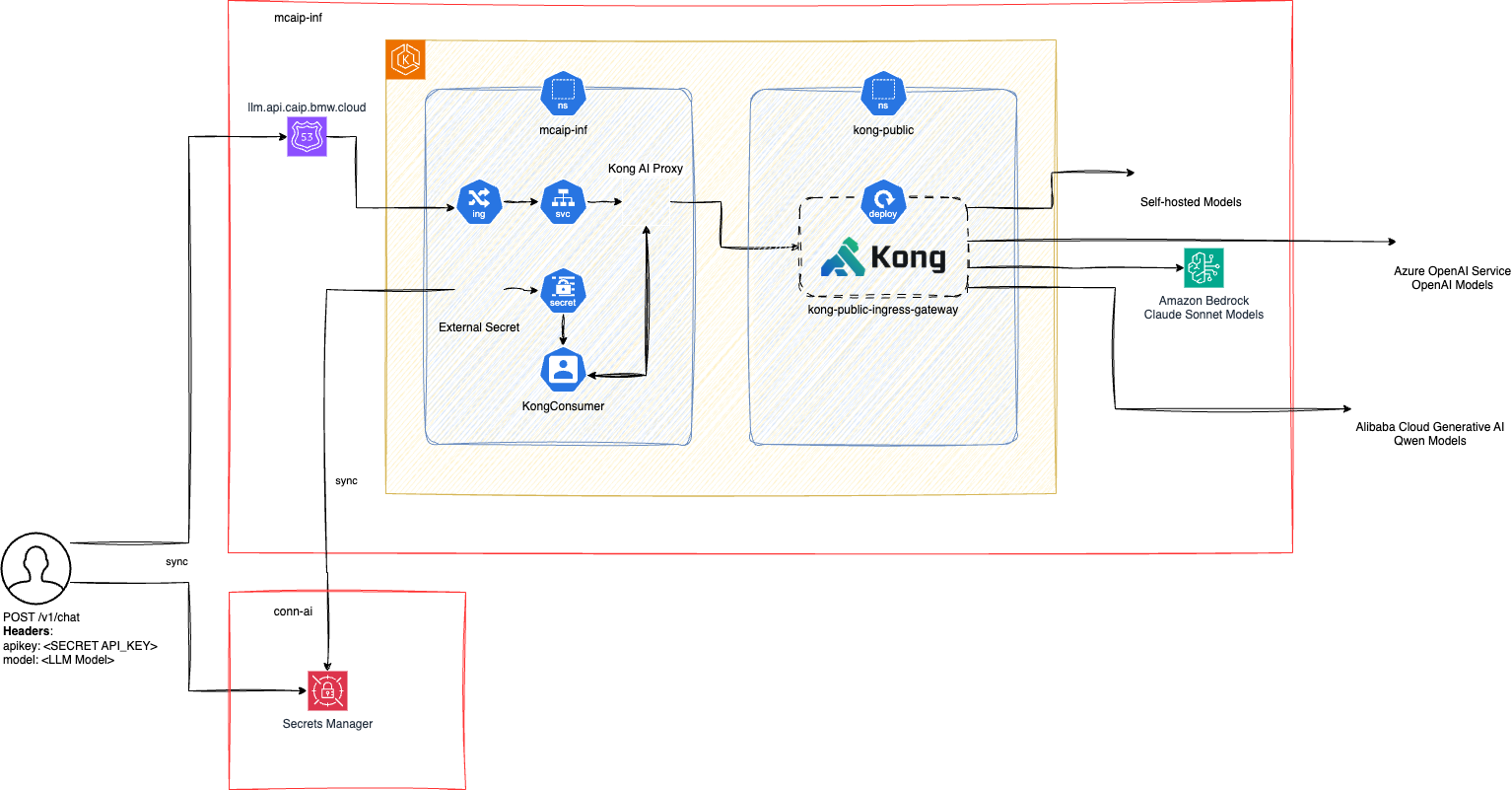
Key Components
- LiteLLM Proxy: Model routing, load balancing, and provider abstraction (RoW)
- Kong API Gateway: API gateway and routing
- External Secret Management: API key synchronization
- Multi-provider Support: AWS Bedrock, Azure OpenAI, Alibaba Cloud, Self-Hosted (CAIP cluster)
- Regional Deployment: Support for both RoW and China regions
- Provider Fallbacks: Automatic failover to alternative models when a provider fails (RoW)
Regional Distribution
Rest of World (RoW):
- Primary deployment region for global BMW operations
- Full access to AWS Bedrock and Azure OpenAI models
- Production URL:
https://llm.api.caip.bmw.cloud - Backend: LiteLLM-based proxy with fallback support
China Region:
- Dedicated deployment for China operations
- Specialized access to Alibaba Cloud models (Qwen, DeepSeek)
- Production URL:
https://llm.api.caip.bmwchina.cloud - Backend: LiteLLM-based proxy with fallback support
Model Provider Integration
AWS Bedrock
- Models: Claude (Anthropic), Nova (Amazon), Llama (Meta), DeepSeek, Qwen
- Features: Streaming support, high availability
- Region: Primarily RoW
Azure OpenAI
- Models: GPT-4o, GPT-4.1, GPT-5 series, o3, image generation (GPT Image), video generation (Sora), TTS, transcription
- Features: Latest OpenAI models, embeddings support, Responses API
- Region: Primarily RoW
Alibaba Cloud
- Models: Qwen series, DeepSeek R1/V3
- Features: China-optimized models, long context support
- Region: Primarily China
Self-Hosted (CAIP Cluster)
- Models: Qwen3 (chat, embedding, ASR), FLUX.2 (image), Wan2.2 (video)
- Features: Zero cost, full VPC isolation, no data egress, open-source models
- Region: RoW (runs on-cluster GPU infrastructure)
- Status: Early access / beta — see Self-Hosted Models
Security & Compliance
- API Key Authentication: Secure token-based access
- Regional Data Residency: Data processing within respective regions
- BMW Security Standards: Full compliance with BMW's security requirements
- Encrypted Communication: TLS 1.3 for all API communications
Performance & Reliability
- Load Balancing: Distributed across multiple instances
- Auto-scaling: Dynamic resource allocation based on demand
- Health Monitoring: Continuous service health checks
- Failover Support: Automatic switching between healthy instances
API Key Management
Current Process
API keys can be obtained through the Self-Service Portal or by raising a Service Request.
Only UUID-format keys (e.g. 123e4567-e89b-12d3-a456-426614174000) are accepted. Old-format keys that have exceeded their 90-day validity window are deprecated.
Future Implementation
- API key management will be available through the ConnectedAI portal
- Self-service API key generation and management
- Automatic key rotation and synchronization
Key Replication Setup
The platform implements an API key sync mechanism that replicates all API key secrets from the /caip_llm_api_keys/ path of AWS Secrets Manager in the Conn-AI Prod account to the MCAIP-INF Prod cluster.
API Key Rotation (In Progress)
- Will be implemented by the ConnectedAI portal
- Automatic synchronization via External Secrets Operator
- No manual intervention required for key rotation
Best Practices
Model Selection
- Use the
modelparameter in the payload to specify your preferred model - Consider regional availability when selecting models
- For streaming responses, ensure the model supports streaming
- Choose models based on your specific use case:
- claude-haiku-4.5: Fast responses, cost-effective for simple tasks
- gpt-4o: Latest OpenAI capabilities with strong reasoning
- gpt-5: Flagship reasoning model for complex tasks
- nova-pro: AWS native model with enterprise features
Error Handling
- Implement proper retry logic for API calls
- Handle rate limiting appropriately (429 status codes)
- Monitor API usage and costs
- Set appropriate timeout values for your application needs
- Log errors for debugging and monitoring purposes
Retry Strategy Example
import time
import random
from openai import OpenAI

def make_api_call_with_retry(client, messages, max_retries=3):
    for attempt in range(max_retries):
        try:
            response = client.chat.completions.create(
                model="gpt-4o",
                messages=messages,
                extra_headers={"x-test-header": "some-internal-id"}
            )
            return response
        except Exception as e:
            if attempt == max_retries - 1:
                raise e

            # Exponential backoff with jitter
            wait_time = (2 ** attempt) + random.uniform(0, 1)
            time.sleep(wait_time)
Performance Optimization
Request Optimization
- Minimize token usage: Keep prompts concise while maintaining clarity
- Use system messages: Set context once rather than repeating in each message
- Batch similar requests: Group related queries when possible
- Cache frequent responses: Store responses for repeated queries
Response Optimization
- Use streaming: For real-time applications, enable streaming responses
- Set appropriate max_tokens: Limit response length to reduce costs
- Filter unnecessary content: Process only the required parts of responses
Cost Management
Token Efficiency
- Monitor token usage regularly through usage reports
- Optimize prompts to reduce unnecessary tokens
- Use shorter model names where possible
- Consider using smaller models for simple tasks
Budget Controls
- Set up usage alerts and monitoring
- Implement application-level usage limits
- Review usage patterns monthly
- Optimize applications based on usage data
Development Best Practices
Environment Management
- Use environment variables for API keys
- Implement proper logging and monitoring
- Set up different configurations for dev/test/prod environments
- Use configuration files for model selection per environment
Security
- Store API keys securely (use environment variables or secret management)
- Never commit API keys to version control
- Rotate API keys regularly when the feature becomes available
Rate Limiting and Usage Guidelines
Current Rate Limits
The LLM API implements rate limiting to ensure fair usage and optimal performance:
- Requests per minute: 100 requests per API key
- Tokens per minute: 150,000 tokens per API key
- Concurrent requests: 10 simultaneous requests per API key
Usage Monitoring
- API usage is tracked and monitored per API key
- Usage reports are available through the Connected AI Platform portal (coming soon)
- Alerts are sent when approaching rate limits
Best Practices for Rate Limits
- Implement exponential backoff for retry logic
- Batch requests when possible to reduce API calls
- Cache responses for repeated queries
- Monitor usage patterns to optimize application performance
Fair Usage Policy
The LLM API is intended for legitimate business use cases within BMW Group. Please adhere to the following guidelines:
- Use the API only for approved BMW business purposes
- Do not attempt to circumvent rate limits
- Report any suspicious activity or abuse
- Optimize applications to minimize unnecessary API calls
Enterprise Usage
For enterprise applications requiring higher rate limits:
- Contact the Connected AI Platform team for custom rate limit configurations
- Provide business justification and expected usage patterns
- Enterprise SLAs are available for critical business applications
Troubleshooting
Common Issues
1. Authentication Errors (401 Unauthorized)
Problem: API returns 401 status code Causes:
- Incorrect API key
- Missing Authorization header
- API key not activated
Solutions:
# Verify your API key is correctly set with the Bearer prefix
curl -X POST https://llm.api.caip.bmw.cloud/v1/chat/completions \
  -H "Authorization: Bearer your_api_key_here" \
  -H "Content-Type: application/json" \
  -d '{"model": "gpt-4o", "messages": [{"role": "user", "content": "test"}]}'
2. Model Not Available (400 Bad Request)
Problem: Specified model is not available in your region Causes:
- Model not supported in current region
- Incorrect model name spelling
- Model temporarily unavailable
Solutions:
- Check model availability for your region in the documentation
- Verify model name spelling matches exactly
- Try an alternative model from the same provider
3. Rate Limiting (429 Too Many Requests)
Problem: API calls are being rate limited Causes:
- Exceeding requests per minute limit
- Too many concurrent requests
- Token limit exceeded
Solutions:
# Implement exponential backoff
import time
import random

def handle_rate_limit(func, *args, **kwargs):
    max_retries = 5
    for attempt in range(max_retries):
        try:
            return func(*args, **kwargs)
        except Exception as e:
            if "429" in str(e) and attempt < max_retries - 1:
                wait_time = (2 ** attempt) + random.uniform(0, 1)
                time.sleep(wait_time)
            else:
                raise e
4. Streaming Issues
Problem: Streaming responses not working correctly Causes:
- Model doesn't support streaming
- Incorrect streaming parameter usage
- Client timeout issues
Solutions:
- Ensure the model supports streaming (check model documentation)
- Set
stream: truefor streaming-only models - Increase client timeout for streaming responses
5. Large Response Truncation
Problem: Responses are being cut off Causes:
- Response exceeds model's max token limit
- Client timeout too short
- Network issues
Solutions:
- Set appropriate
max_tokensparameter - Increase client timeout settings
- Break large requests into smaller chunks
6. Regional Access Issues
Problem: Cannot access API from certain regions Causes:
- Using wrong regional endpoint
- Network restrictions
- Firewall blocking requests
Solutions:
- Use correct regional URL:
- RoW:
https://llm.api.caip.bmw.cloud - China:
https://llm.api.caip.bmwchina.cloud
- RoW:
- Check network connectivity and firewall rules
Debugging Steps
1. Enable Debug Logging
import logging
import openai

# Enable OpenAI debug logging
logging.basicConfig(level=logging.DEBUG)
openai.log = "debug"
2. Test with Curl
# Basic connectivity test using the recommended format
curl -v https://llm.api.caip.bmw.cloud/v1/chat/completions \
  -H "Authorization: Bearer your_api_key" \
  -H "Content-Type: application/json" \
  -d '{"model": "gpt-4o", "messages": [{"role": "user", "content": "Hello"}]}'
3. Verify Headers
# Print request headers for debugging
response = client.chat.completions.create(
    model="gpt-4o",
    messages=[{"role": "user", "content": "test"}],
    extra_headers={"x-test-header": "some-internal-id"}
)
print(f"Request headers: {response.response.headers}")